Google Calendar: Add AND remove calendars
Chrome extension to turn the "Add a coworker's calendar" field in Google Calendar into a toggle for adding AND removing calendars.
Co je Google Calendar: Add AND remove calendars?
Google Calendar: Add AND remove calendars je rozšíření Chrome vyvinuté Seth Walker, a jeho hlavní funkcí je „Chrome extension to turn the "Add a coworker's calendar" field in Google Calendar into a toggle for adding AND removing calendars.“.
Stáhnout soubor CRX rozšíření Google Calendar: Add AND remove calendars
Stáhněte si soubory rozšíření Google Calendar: Add AND remove calendars ve formátu crx, ručně nainstalujte rozšíření Chrome do prohlížeče nebo sdílejte soubory crx s přáteli, abyste jednoduše nainstalovali rozšíření Chrome.
Pokyny pro Použití Rozšíření
                        Chrome extension to turn the "Add a coworker's calendar" field in Google Calendar into a toggle for adding AND removing calendars.

It also sorts coworkers calendars to put active calendars at the top.
Základní Informace o Rozšíření
| Název | 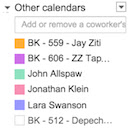 Google Calendar: Add AND remove calendars Google Calendar: Add AND remove calendars |
| ID | dooidmblcmickgannljbomjfccagbhlh |
| Oficiální URL | https://chrome.google.com/webstore/detail/google-calendar-add-and-r/dooidmblcmickgannljbomjfccagbhlh |
| Popis | Chrome extension to turn the "Add a coworker's calendar" field in Google Calendar into a toggle for adding AND removing calendars. |
| Velikost souboru | 194 KB |
| Počet instalací | 33 |
| Aktuální Verze | 0.1 |
| Poslední Aktualizace | 2014-10-28 |
| Datum Vydání | 2014-10-28 |
| Vývojář | Seth Walker |
| Typ Platby | free |
| Podporované Jazyky | en |
| manifest.json | |
{
    "update_url": "https:\/\/clients2.google.com\/service\/update2\/crx",
    "name": "Google Calendar: Add AND remove calendars",
    "description": "Chrome extension to turn the \"Add a coworker's calendar\" field in Google Calendar into a toggle for adding AND removing calendars.",
    "version": "0.1",
    "content_scripts": [
        {
            "matches": [
                "https:\/\/www.google.com\/calendar\/*",
                "http:\/\/www.google.com\/calendar\/*"
            ],
            "js": [
                "node_modules\/email-addresses\/lib\/email-addresses.js",
                "node_modules\/underscore\/underscore.js",
                "index.js"
            ],
            "run_at": "document_end"
        }
    ],
    "permissions": [
        "https:\/\/www.google.com\/calendar\/*"
    ],
    "icons": {
        "128": "icon128.png"
    },
    "manifest_version": 2
} | |