Rex - RegEx Highlight or Collapse Text
Use regular expressions to highlight or collapse text. Useful for logs or stacktraces.
Co je Rex - RegEx Highlight or Collapse Text?
Rex - RegEx Highlight or Collapse Text je rozšíření Chrome vyvinuté cgrossde, a jeho hlavní funkcí je „Use regular expressions to highlight or collapse text. Useful for logs or stacktraces.“.
Snímky obrazovky rozšíření

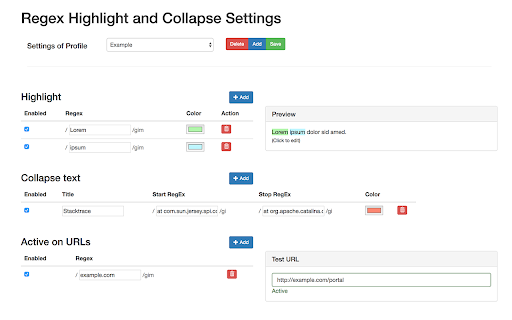
Stáhnout soubor CRX rozšíření Rex - RegEx Highlight or Collapse Text
Stáhněte si soubory rozšíření Rex - RegEx Highlight or Collapse Text ve formátu crx, ručně nainstalujte rozšíření Chrome do prohlížeče nebo sdílejte soubory crx s přáteli, abyste jednoduše nainstalovali rozšíření Chrome.
Pokyny pro Použití Rozšíření
                        This extension allows to use regular expressions to highlight or collapse text on a web page. It was developed to facilitate log analysis (e.g. highlight important parts of stacktraces and collapsing framework noise)

GitHub: https://github.com/cgrossde/rex
Základní Informace o Rozšíření
| Název |  Rex - RegEx Highlight or Collapse Text Rex - RegEx Highlight or Collapse Text |
| ID | eejlhekkafpkffbhpidchepheodkgnib |
| Oficiální URL | https://chromewebstore.google.com/detail/rex-regex-highlight-or-co/eejlhekkafpkffbhpidchepheodkgnib |
| Popis | Use regular expressions to highlight or collapse text. Useful for logs or stacktraces. |
| Velikost souboru | 314 KB |
| Počet instalací | 192 |
| Aktuální Verze | 0.3.1 |
| Poslední Aktualizace | 2018-09-06 |
| Datum Vydání | 2018-09-06 |
| Hodnocení | 5.00/5 Celkem 3 Hodnocení |
| Vývojář | cgrossde |
| Typ Platby | free |
| Webové stránky Rozšíření | https://github.com/cgrossde/rex |
| Podporované Jazyky | en |
| manifest.json | |
{
    "update_url": "https:\/\/clients2.google.com\/service\/update2\/crx",
    "manifest_version": 2,
    "name": "Rex - RegEx Highlight or Collapse Text",
    "short_name": "REX",
    "description": "Use regular expressions to highlight or collapse text. Useful for logs or stacktraces.",
    "version": "0.3.1",
    "content_security_policy": "script-src 'self' 'unsafe-eval'; object-src 'self'",
    "icons": {
        "128": "img\/icon128.png",
        "48": "img\/icon48.png",
        "32": "img\/icon32.png"
    },
    "offline_enabled": true,
    "web_accessible_resources": [
        "css\/content.css",
        "js\/*.js"
    ],
    "content_scripts": [
        {
            "run_at": "document_idle",
            "matches": [
                "*:\/\/*\/*",
                "file:\/\/\/*\/*"
            ],
            "css": [
                "css\/content.css"
            ],
            "js": [
                "js\/content\/content.js"
            ]
        }
    ],
    "background": {
        "scripts": [
            "js\/background.js"
        ],
        "persistent": false
    },
    "options_page": "options.html",
    "permissions": [
        "activeTab",
        "storage"
    ],
    "browser_action": {
        "default_title": "Rex - Search and Highlight",
        "default_icon": "img\/icon48.png",
        "default_popup": "popup.html"
    }
} | |