TaxAdda PMS Login
TaxAdda PMS Login Extension allows CA and Tax Professionals to login into Client's Accounts in GST and Income Tax Portals.
Co je TaxAdda PMS Login?
TaxAdda PMS Login je rozšíření Chrome vyvinuté https://taxadda.com, a jeho hlavní funkcí je „TaxAdda PMS Login Extension allows CA and Tax Professionals to login into Client's Accounts in GST and Income Tax Portals.“.
Snímky obrazovky rozšíření


Stáhnout soubor CRX rozšíření TaxAdda PMS Login
Stáhněte si soubory rozšíření TaxAdda PMS Login ve formátu crx, ručně nainstalujte rozšíření Chrome do prohlížeče nebo sdílejte soubory crx s přáteli, abyste jednoduše nainstalovali rozšíření Chrome.
Pokyny pro Použití Rozšíření
                        This extension enables CA & Tax practitioners to login in their client's GST or Income tax portals with one click. When you login in GST or IT portal with new username then it gives option to save such client. When you use already existing username but new password then it automatically updates password. Auto-sync between multiple computers.

You has to subscribe to either TaxAdda Login Tool or TaxAdda PMS.

TaxAdda Login Tool is specifically made to facilitate the login in GST and Income Tax portals. Know more at https://taxadda.com/gst-income-tax-login-tool/

This extension is also available for TaxAdda PMS users. TaxAdda PMS is a full fledged practice management software for Chartered Accountants and Tax Professionals. Subscribers of TaxAdda PMS can also use this extensions for login in client's account. Know more at https://taxadda.com/practice-management-software-for-ca-tax-professionals/

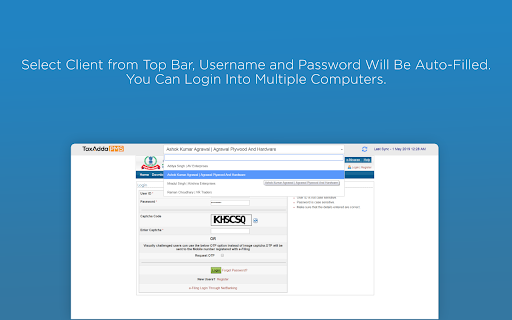
After installing this extension, you will get a small bar at top on GST and Income Tax login pages. You just need to select the client and client's username and password will be auto-filled. So you need not type it every time.

TaxAdda PMS has the following features:-

1) Just enter GSTIN and all details such as Client Name, Trade Name, Registration Date etc will be fetched from GSTN.

2) Get return status of a client in one click directly from GSTN.

3) Create return task of all clients in one click.

4) See task status of all clients in one page. Just like excel but with a much better interface and tracking.
Základní Informace o Rozšíření
| Název |  TaxAdda PMS Login TaxAdda PMS Login |
| ID | efebjdlhfmhgfinbomaklemolefmemap |
| Oficiální URL | https://chromewebstore.google.com/detail/taxadda-pms-login/efebjdlhfmhgfinbomaklemolefmemap |
| Popis | TaxAdda PMS Login Extension allows CA and Tax Professionals to login into Client's Accounts in GST and Income Tax Portals. |
| Velikost souboru | 947 KB |
| Počet instalací | 2,683 |
| Aktuální Verze | 7.0.7 |
| Poslední Aktualizace | 2023-04-28 |
| Datum Vydání | 2020-07-02 |
| Hodnocení | 5.00/5 Celkem 5 Hodnocení |
| Vývojář | https://taxadda.com |
| [email protected] | |
| Typ Platby | free |
| Webové stránky Rozšíření | https://pms.taxadda.com/ |
| URL Stránky Nápovědy | https://pms.taxadda.com/support |
| URL Stránky Zásad Ochrany Soukromí | https://taxadda.com/privacy-policy |
| Podporované Jazyky | en |
| manifest.json | |
{
    "update_url": "https:\/\/clients2.google.com\/service\/update2\/crx",
    "name": "__MSG_appName__",
    "short_name": "__MSG_appShortName__",
    "description": "__MSG_appDescription__",
    "version": "7.0.7",
    "manifest_version": 2,
    "default_locale": "en",
    "icons": {
        "16": "images\/icon-16.png",
        "128": "images\/icon-128.png"
    },
    "background": {
        "scripts": [
            "libs\/jquery.js",
            "libs\/crypto-js.min.js",
            "scripts\/config.js",
            "scripts\/background.js"
        ]
    },
    "browser_action": {
        "default_icon": {
            "19": "images\/icon-19.png",
            "38": "images\/icon-38.png"
        },
        "default_title": "__MSG_browserActionTitle__",
        "default_popup": "pages\/popup.html"
    },
    "content_scripts": [
        {
            "matches": [
                "https:\/\/services.gst.gov.in\/services\/login",
                "https:\/\/services.gst.gov.in\/services\/forgotpassword",
                "https:\/\/services.gst.gov.in\/services\/auth\/changepassword",
                "https:\/\/services.gst.gov.in\/services\/auth\/fowelcome"
            ],
            "css": [
                "styles\/style-gst.css"
            ],
            "run_at": "document_end",
            "all_frames": false
        },
        {
            "matches": [
                "https:\/\/portal.incometaxindiaefiling.gov.in\/e-Filing\/UserLogin\/Login**",
                "https:\/\/lite.incometaxindiaefiling.gov.in\/e-Filing\/UserLogin\/Login**",
                "https:\/\/www1.incometaxindiaefiling.gov.in\/e-FilingGS\/ResetPassword**",
                "https:\/\/portal.incometaxindiaefiling.gov.in\/e-Filing\/MyAccount\/ChangePasswordLink**",
                "https:\/\/portal.incometaxindiaefiling.gov.in\/e-Filing\/MyAccount\/MyAccountHome**",
                "https:\/\/portal.incometaxindiaefiling.gov.in\/e-Filing\/Services\/SkipAddressUpdate**",
                "https:\/\/portal.incometaxindiaefiling.gov.in\/e-Filing\/Services\/LoginAfterAddressUpdate**",
                "https:\/\/portal.incometaxindiaefiling.gov.in\/e-Filing\/UserLogin\/BankPanAction**",
                "https:\/\/eportal.incometax.gov.in\/iec\/foservices\/*"
            ],
            "css": [
                "styles\/style-tax.css"
            ],
            "run_at": "document_end",
            "all_frames": false
        },
        {
            "matches": [
                "https:\/\/services.gst.gov.in\/services\/login",
                "https:\/\/services.gst.gov.in\/services\/forgotpassword",
                "https:\/\/services.gst.gov.in\/services\/auth\/changepassword",
                "https:\/\/portal.incometaxindiaefiling.gov.in\/e-Filing\/UserLogin\/Login**",
                "https:\/\/lite.incometaxindiaefiling.gov.in\/e-Filing\/UserLogin\/Login**",
                "https:\/\/services.gst.gov.in\/services\/auth\/fowelcome",
                "https:\/\/www1.incometaxindiaefiling.gov.in\/e-FilingGS\/ResetPassword**",
                "https:\/\/portal.incometaxindiaefiling.gov.in\/e-Filing\/MyAccount\/Change**",
                "https:\/\/portal.incometaxindiaefiling.gov.in\/e-Filing\/MyAccount\/MyAccountHome**",
                "https:\/\/portal.incometaxindiaefiling.gov.in\/e-Filing\/Services\/SkipAddressUpdate**",
                "https:\/\/portal.incometaxindiaefiling.gov.in\/e-Filing\/Services\/LoginAfterAddressUpdate**",
                "https:\/\/portal.incometaxindiaefiling.gov.in\/e-Filing\/UserLogin\/BankPanAction**",
                "https:\/\/eportal.incometax.gov.in\/iec\/foservices\/*"
            ],
            "css": [
                "styles\/select2.min.css",
                "styles\/vanillatoasts.css"
            ],
            "js": [
                "libs\/jquery.js",
                "libs\/crypto-js.min.js",
                "libs\/vanillatoasts.js",
                "libs\/select2.min.js",
                "scripts\/content.js"
            ],
            "run_at": "document_end",
            "all_frames": false
        },
        {
            "matches": [
                "https:\/\/web.whatsapp.com\/**"
            ],
            "css": [
                "styles\/vanillatoasts.css",
                "styles\/wpapp.css"
            ],
            "js": [
                "libs\/jquery.js",
                "libs\/vanillatoasts.js",
                "scripts\/wpapp.js"
            ],
            "run_at": "document_end",
            "all_frames": false
        }
    ],
    "permissions": [
        "tabs",
        "notifications",
        "https:\/\/pms.taxadda.com\/**",
        "https:\/\/loginapi.taxadda.com\/**",
        "http:\/\/dev.taxadda.com\/**",
        "storage"
    ],
    "web_accessible_resources": [
        "images\/*",
        "pages\/add-new-client.html"
    ]
} | |