Evercuts
Keyboard shortcuts for the new Evernote UI
Co je Evercuts?
Evercuts je rozšíření Chrome vyvinuté realpdev, a jeho hlavní funkcí je „Keyboard shortcuts for the new Evernote UI“.
Snímky obrazovky rozšíření

Stáhnout soubor CRX rozšíření Evercuts
Stáhněte si soubory rozšíření Evercuts ve formátu crx, ručně nainstalujte rozšíření Chrome do prohlížeče nebo sdílejte soubory crx s přáteli, abyste jednoduše nainstalovali rozšíření Chrome.
Pokyny pro Použití Rozšíření
                        Deprecated!! Do not install as it likely will no longer work

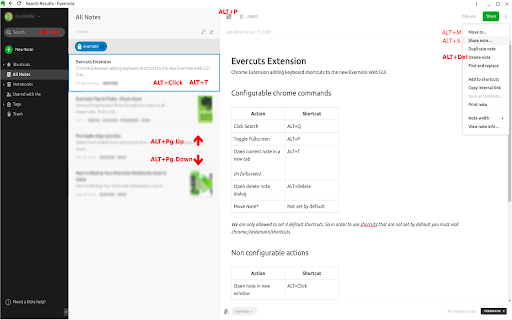
Evercuts provides keyboard shortcuts to the new Evernote Web Interface.

Developed to increase productivity when using the web interface. Free and open source.

The extension add the following keyboard shortcuts
1. Search Notes (Alt+Q)
2. View note in fullscreen (Alt+P)
3.  Move Note (Alt+M)
4. Delete Note (Alt+Delete)
5. Open note in new window (Alt+Click)
6. Copy Internal Web Link*
7. Copy Internal App Link*
8. Open note in new tab*
9. Open Insert Menu*
10. Edit Tags*

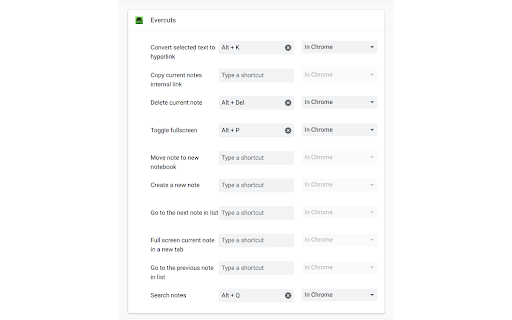
Items marked with *  are not set by default.  Visit chrome://extensions/shortcuts to configure

Note:
All shortcuts are configurable except for Alt+Click because it is not setup with chrome commands.

You must visit chrome://extensions/shortcuts to see the keyboard shortcuts active configuration.

Disclaimer:
I have no affiliations with Evernote and cannot guarantee the shortcuts will continue to work if Evernote changes the UI.


Release Notes:
Version 1.4 - Shortcut to create hyperlink
Version 1.5 - Fixes issue with creating hyperlink on small windows
Version 1.6 - Adds a new shortcut to create a new note
Version 1.7 - bug fixes for EN web version > 13.0 (Also removed hyperlink shortcut. As it works natively now)
Version 1.8 - New shortcuts: insert menu, edit tags. Popup now has accurate info and link to edit shortcuts
Version 1.9 - Fixes shortcut for copying web link. Adds shortcut for copying app link. General performance and reliability changes
Version 1.10 - fixes toggle fullscreen for evernote web version 10.8.4
Version 1.11 - adds shortcut to open popup
Version 1.12 - removes shortcuts from next/prev note
Version 1.13 - fixes toggle fullscreen for evernote web version 10.58.8 and removes shortcut for new note
Základní Informace o Rozšíření
| Název |  Evercuts Evercuts |
| ID | hojeljpilmhieiaecibmdmdjhfijecgd |
| Oficiální URL | https://chromewebstore.google.com/detail/evercuts/hojeljpilmhieiaecibmdmdjhfijecgd |
| Popis | Keyboard shortcuts for the new Evernote UI |
| Velikost souboru | 1.57 MB |
| Počet instalací | 321 |
| Aktuální Verze | 1.13 |
| Poslední Aktualizace | 2024-02-05 |
| Datum Vydání | 2020-07-01 |
| Hodnocení | 4.64/5 Celkem 11 Hodnocení |
| Vývojář | realpdev |
| [email protected] | |
| Typ Platby | free |
| Webové stránky Rozšíření | https://github.com/RealP/evercuts |
| URL Stránky Nápovědy | https://github.com/RealP/evercuts/issues |
| Podporované Jazyky | en |
| manifest.json | |
{
    "update_url": "https:\/\/clients2.google.com\/service\/update2\/crx",
    "name": "Evercuts",
    "version": "1.13",
    "description": "Keyboard shortcuts for the new Evernote UI",
    "permissions": [
        "activeTab",
        "declarativeContent"
    ],
    "background": {
        "scripts": [
            "content_scripts\/background.js"
        ],
        "persistent": false
    },
    "page_action": {
        "default_popup": "popup\/index.html",
        "default_icon": {
            "16": "images\/evers16.png",
            "32": "images\/evers32.png",
            "48": "images\/evers48.png",
            "128": "images\/evers128.png"
        }
    },
    "icons": {
        "16": "images\/evers16.png",
        "32": "images\/evers32.png",
        "48": "images\/evers48.png",
        "128": "images\/evers128.png"
    },
    "commands": {
        "search": {
            "suggested_key": {
                "default": "Alt+Q"
            },
            "description": "Search notes"
        },
        "fullscreen": {
            "suggested_key": {
                "default": "Alt+P"
            },
            "description": "Toggle fullscreen"
        },
        "deletenote": {
            "suggested_key": {
                "default": "Alt+Delete"
            },
            "description": "Delete current note"
        },
        "movenote": {
            "suggested_key": {
                "default": "Alt+M"
            },
            "description": "Move note to new notebook"
        },
        "opennote": {
            "description": "Full screen current note in a new tab"
        },
        "copyinternallink": {
            "description": "Copy current notes internal web link"
        },
        "copyinternalapplink": {
            "description": "Copy current notes internal app link"
        },
        "insertMenu": {
            "description": "Opens the insert menu"
        },
        "editTags": {
            "description": "Edit the current notes tags"
        },
        "_execute_page_action": {
            "description": "Show shorcuts and options"
        }
    },
    "content_scripts": [
        {
            "matches": [
                "https:\/\/*.evernote.com\/*"
            ],
            "js": [
                "content_scripts\/contentScript.js"
            ]
        }
    ],
    "manifest_version": 2
} | |