HTML Style Quick Viewer
HTML DOM element style quick viewer
Co je HTML Style Quick Viewer?
HTML Style Quick Viewer je rozšíření Chrome vyvinuté _(:з」∠)_, a jeho hlavní funkcí je „HTML DOM element style quick viewer“.
Snímky obrazovky rozšíření
Stáhnout soubor CRX rozšíření HTML Style Quick Viewer
Stáhněte si soubory rozšíření HTML Style Quick Viewer ve formátu crx, ručně nainstalujte rozšíření Chrome do prohlížeče nebo sdílejte soubory crx s přáteli, abyste jednoduše nainstalovali rozšíření Chrome.
Pokyny pro Použití Rozšíření
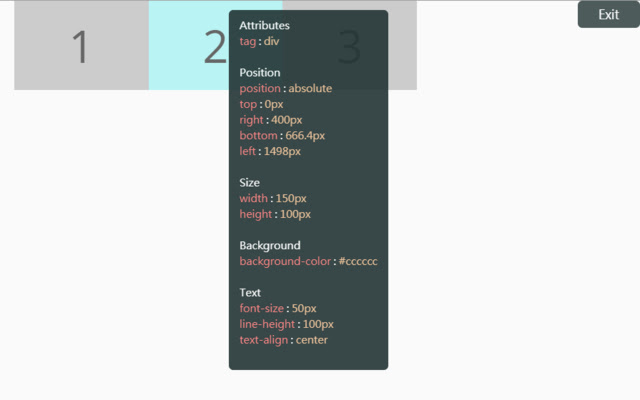
                        How about viewing the HTML DOM styles in a different way?
Just move your mouse and it shows the target's styles.

After installation, you may have to reload tabs to for the extension to take effect.

Instructions:
1. Click HTML Style Quick Viewer in the toolbar, then click 'run' button to start.
2. Move mouse to see the element's styles.
3. Mouse left click to close the popup panel.
4. Mouse middle click to pin the popup panel.
5. Click the 'Exit' button at the top-right or click 'Stop' button through the toolbar to stop.
Základní Informace o Rozšíření
| Název |  HTML Style Quick Viewer HTML Style Quick Viewer |
| ID | inafmkpmbkldliccdbeieeafnbkcmmap |
| Oficiální URL | https://chrome.google.com/webstore/detail/html-style-quick-viewer/inafmkpmbkldliccdbeieeafnbkcmmap |
| Popis | HTML DOM element style quick viewer |
| Velikost souboru | 15.88 KB |
| Počet instalací | 271 |
| Aktuální Verze | 1.0.2 |
| Poslední Aktualizace | 2018-08-26 |
| Datum Vydání | 2018-08-26 |
| Hodnocení | 5.00/5 Celkem 3 Hodnocení |
| Vývojář | _(:з」∠)_ |
| [email protected] | |
| Typ Platby | free |
| Podporované Jazyky | en |
| manifest.json | |
{
    "update_url": "https:\/\/clients2.google.com\/service\/update2\/crx",
    "name": "HTML Style Quick Viewer",
    "description": "HTML DOM element style quick viewer",
    "version": "1.0.2",
    "permissions": [
        "activeTab"
    ],
    "content_scripts": [
        {
            "matches": [
                "http:\/\/*\/*",
                "https:\/\/*\/*"
            ],
            "js": [
                "content\/content.js"
            ],
            "css": [
                "content\/content.css"
            ],
            "run_at": "document_start"
        }
    ],
    "browser_action": {
        "default_title": "HTML Style Quick Viewer\nRight click (Close)\nMiddle click (Pin)",
        "default_icon": {
            "16": "icons\/icon_16.png",
            "32": "icons\/icon_32.png",
            "48": "icons\/icon_48.png",
            "128": "icons\/icon_128.png"
        },
        "default_popup": "popup\/popup.html"
    },
    "manifest_version": 2
} | |