UCLA Automated Login
Tired of entering your UCLA logon ID and username every single time? Install the UCLA Automated Login! By clicking the icon after…
Co je UCLA Automated Login?
UCLA Automated Login je rozšíření Chrome vyvinuté Stanley Hsu, a jeho hlavní funkcí je „Tired of entering your UCLA logon ID and username every single time? Install the UCLA Automated Login! By clicking the icon after…“.
Snímky obrazovky rozšíření
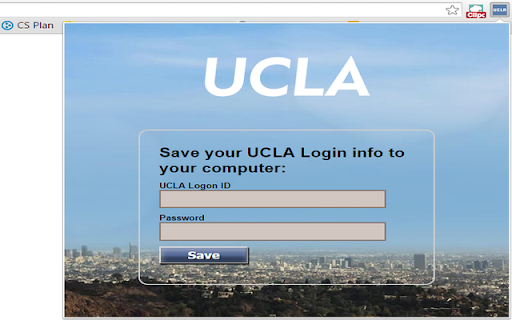
Stáhnout soubor CRX rozšíření UCLA Automated Login
Stáhněte si soubory rozšíření UCLA Automated Login ve formátu crx, ručně nainstalujte rozšíření Chrome do prohlížeče nebo sdílejte soubory crx s přáteli, abyste jednoduše nainstalovali rozšíření Chrome.
Pokyny pro Použití Rozšíření
                        Tired of entering your UCLA logon ID and username every single time?
Install the UCLA Automated Login!

By clicking the icon after installing and entering the logon info, you will never have to manually enter them again.

This extension allows you to automatically log in to all the newly updated UCLA authentication pages.
Základní Informace o Rozšíření
| Název |  UCLA Automated Login UCLA Automated Login |
| ID | inelalkinoinjgbfjfmkfiagmfefpeic |
| Oficiální URL | https://chromewebstore.google.com/detail/ucla-automated-login/inelalkinoinjgbfjfmkfiagmfefpeic |
| Popis | Tired of entering your UCLA logon ID and username every single time? Install the UCLA Automated Login! By clicking the icon after… |
| Velikost souboru | 150 KB |
| Počet instalací | 13 |
| Aktuální Verze | 2.0.1 |
| Poslední Aktualizace | 2015-11-10 |
| Datum Vydání | 2015-11-10 |
| Hodnocení | 5.00/5 Celkem 3 Hodnocení |
| Vývojář | Stanley Hsu |
| Typ Platby | free |
| Podporované Jazyky | en |
| manifest.json | |
{
    "update_url": "http:\/\/clients2.google.com\/service\/update2\/crx",
    "name": "UCLA Automated Login",
    "version": "2.0.1",
    "manifest_version": 2,
    "icons": {
        "16": "images\/icon16.png",
        "48": "images\/icon48.png",
        "128": "images\/ucla128.png"
    },
    "background": {
        "page": "background.html"
    },
    "permissions": [
        "tabs",
        "https:\/\/*\/*"
    ],
    "options_page": "optionPage.html",
    "browser_action": {
        "default_icon": "images\/icon16.png",
        "default_title": "UCLA Automated Login",
        "default_popup": "options.html"
    }
} | |