Journal access through HKU library
A simple chrome extension that let you access journal through HKU library resources (HKU ID needed).
Co je Journal access through HKU library?
Journal access through HKU library je rozšíření Chrome vyvinuté junyichen, a jeho hlavní funkcí je „A simple chrome extension that let you access journal through HKU library resources (HKU ID needed).“.
Snímky obrazovky rozšíření


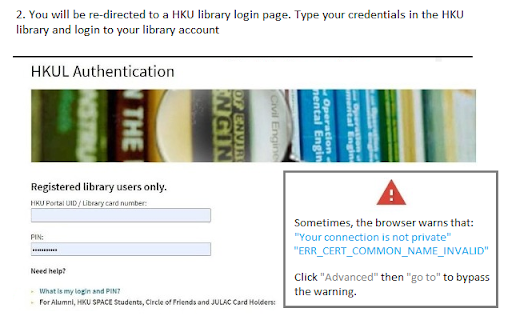
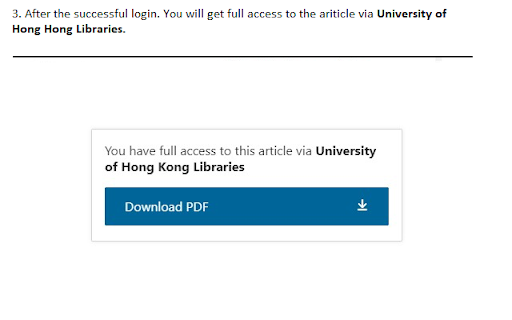
Stáhnout soubor CRX rozšíření Journal access through HKU library
Stáhněte si soubory rozšíření Journal access through HKU library ve formátu crx, ručně nainstalujte rozšíření Chrome do prohlížeče nebo sdílejte soubory crx s přáteli, abyste jednoduše nainstalovali rozšíření Chrome.
Pokyny pro Použití Rozšíření
An extension that redirect you from the journal page to the HKU library portal. You need to login the HKU library. The extension will automatically parse the current URL of the current paper page to the HKU library address. Základní Informace o Rozšíření
| Název |  Journal access through HKU library Journal access through HKU library |
| ID | lcnnijjgcjfpcfjgnahbcpapbmkiceld |
| Oficiální URL | https://chromewebstore.google.com/detail/journal-access-through-hk/lcnnijjgcjfpcfjgnahbcpapbmkiceld |
| Popis | A simple chrome extension that let you access journal through HKU library resources (HKU ID needed). |
| Velikost souboru | 47.64 KB |
| Počet instalací | 135 |
| Aktuální Verze | 0.0.1 |
| Poslední Aktualizace | 2021-09-02 |
| Datum Vydání | 2021-08-04 |
| Vývojář | junyichen |
| [email protected] | |
| Typ Platby | free |
| Podporované Jazyky | en-US |
| manifest.json | |
{
    "update_url": "https:\/\/clients2.google.com\/service\/update2\/crx",
    "manifest_version": 2,
    "name": "Journal access through HKU library",
    "short_name": "HKULibJ",
    "description": "A simple chrome extension that let you access journal through HKU library resources (HKU ID needed).",
    "version": "0.0.1",
    "minimum_chrome_version": "38",
    "permissions": [
        "contextMenus",
        "tabs"
    ],
    "icons": {
        "16": "assets\/icon16.png",
        "128": "assets\/icon128.png"
    },
    "background": {
        "page": "background.html"
    }
} | |