Salesforce Credentials
Manage your Salesforce Credentials and login with one click.
Co je Salesforce Credentials?
Salesforce Credentials je rozšíření Chrome vyvinuté Alexandr Kurevlev, a jeho hlavní funkcí je „Manage your Salesforce Credentials and login with one click.“.
Snímky obrazovky rozšíření


Stáhnout soubor CRX rozšíření Salesforce Credentials
Stáhněte si soubory rozšíření Salesforce Credentials ve formátu crx, ručně nainstalujte rozšíření Chrome do prohlížeče nebo sdílejte soubory crx s přáteli, abyste jednoduše nainstalovali rozšíření Chrome.
Pokyny pro Použití Rozšíření
                        This extension allows you to manage and store your Salesforce Credentials, login with one click and more...

Key features:

- Manage your credentials: Add/Edit/Delete your credentials within the extension

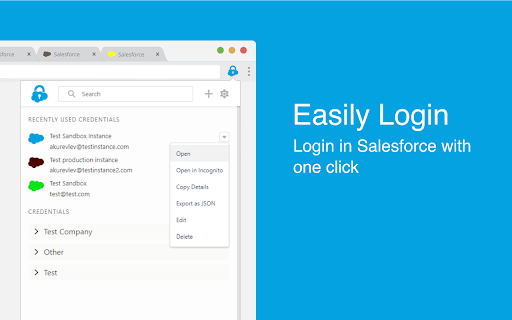
- Easily Login: Login in Salesforce with one click without the verification code

- Add credentials by logging in: Login in Salesforce as you usually do and click 'Add' to add credential

- Login from Address Bar: Enter 'sf' and space in your address bar and start typing username, name or group to login

- Never lose tab: Set your own color for every credential to work on multiple instances at the same time

- Collaborate with your сolleagues: Import and export credentials to file or clipboard to share with your colleagues

- Always in Sync: Keep your Credentials synced with your Google Account in Chrome
Základní Informace o Rozšíření
| Název |  Salesforce Credentials Salesforce Credentials |
| ID | mneimgababoaidaajoibedahomnpmbja |
| Oficiální URL | https://chromewebstore.google.com/detail/salesforce-credentials/mneimgababoaidaajoibedahomnpmbja |
| Popis | Manage your Salesforce Credentials and login with one click. |
| Velikost souboru | 584 KB |
| Počet instalací | 874 |
| Aktuální Verze | 1.4.3 |
| Poslední Aktualizace | 2020-05-05 |
| Datum Vydání | 2020-05-05 |
| Hodnocení | 4.67/5 Celkem 3 Hodnocení |
| Vývojář | Alexandr Kurevlev |
| [email protected] | |
| Typ Platby | free |
| Podporované Jazyky | en |
| manifest.json | |
{
    "update_url": "https:\/\/clients2.google.com\/service\/update2\/crx",
    "manifest_version": 2,
    "name": "Salesforce Credentials",
    "description": "Manage your Salesforce Credentials and login with one click.",
    "version": "1.4.3",
    "browser_action": {
        "default_icon": "icons\/logo\/icon48.png",
        "default_title": "Salesforce Credentials",
        "default_popup": "popup.html"
    },
    "icons": {
        "16": "icons\/logo\/icon16.png",
        "48": "icons\/logo\/icon48.png",
        "128": "icons\/logo\/icon128.png"
    },
    "content_scripts": [
        {
            "run_at": "document_end",
            "matches": [
                "https:\/\/*.salesforce.com\/*",
                "https:\/\/*.force.com\/*",
                "https:\/\/*.visualforce.com\/*"
            ],
            "js": [
                "js\/utils.js",
                "js\/setTabs.js"
            ]
        },
        {
            "matches": [
                "https:\/\/*.salesforce.com\/*",
                "https:\/\/*.force.com\/*",
                "https:\/\/*.visualforce.com\/*"
            ],
            "js": [
                "js\/loginHelper.js"
            ]
        }
    ],
    "web_accessible_resources": [
        "addCredentialPopup.html"
    ],
    "omnibox": {
        "keyword": "sf"
    },
    "background": {
        "scripts": [
            "js\/utils.js",
            "js\/background.build.js"
        ],
        "persistent": false
    },
    "permissions": [
        "https:\/\/*.salesforce.com\/*",
        "https:\/\/*.force.com\/*",
        "https:\/\/*.visualforce.com\/*",
        "storage",
        "tabs",
        "downloads",
        "cookies"
    ]
} | |