Coder Quotes
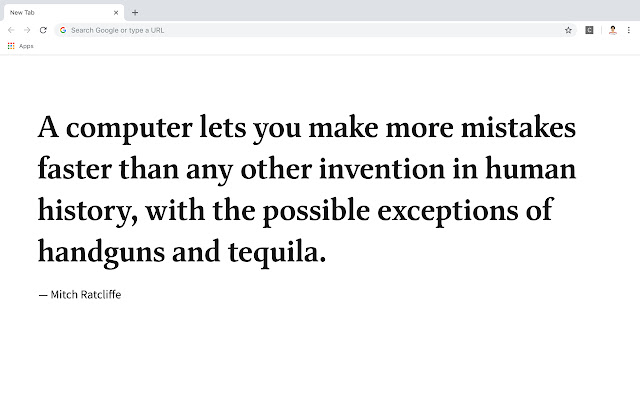
Programming quotes will shows when you open every new tab in chrome
Co je Coder Quotes?
Coder Quotes je rozšíření Chrome vyvinuté http://ajithvgiri.com, a jeho hlavní funkcí je „Programming quotes will shows when you open every new tab in chrome“.
Snímky obrazovky rozšíření
Stáhnout soubor CRX rozšíření Coder Quotes
Stáhněte si soubory rozšíření Coder Quotes ve formátu crx, ručně nainstalujte rozšíření Chrome do prohlížeče nebo sdílejte soubory crx s přáteli, abyste jednoduše nainstalovali rozšíření Chrome.
Pokyny pro Použití Rozšíření
                        Introducing Coder Quotes - .

Coder Quotes can define history, ideas and be crucial in our understanding of so many things - quotes is here to put programming quotes into one place.

Coder quotes is your online library for programmer quotes.
Základní Informace o Rozšíření
| Název |  Coder Quotes Coder Quotes |
| ID | nebgecgefmfhhagfljmmjegmafkdihne |
| Oficiální URL | https://chrome.google.com/webstore/detail/coder-quotes/nebgecgefmfhhagfljmmjegmafkdihne |
| Popis | Programming quotes will shows when you open every new tab in chrome |
| Velikost souboru | 17.55 KB |
| Počet instalací | 48 |
| Aktuální Verze | 1.3 |
| Poslední Aktualizace | 2018-11-17 |
| Datum Vydání | 2018-11-17 |
| Hodnocení | 5.00/5 Celkem 8 Hodnocení |
| Vývojář | http://ajithvgiri.com |
| [email protected] | |
| Typ Platby | free |
| Webové stránky Rozšíření | https://github.com/ajithvgiri/coder_quotes |
| URL Stránky Nápovědy | https://github.com/ajithvgiri/coder_quotes |
| URL Stránky Zásad Ochrany Soukromí | https://www.freeprivacypolicy.com/privacy/view/76930026cda91ac0386a5e843bd4c6ef |
| Podporované Jazyky | en-US |
| manifest.json | |
{
    "update_url": "https:\/\/clients2.google.com\/service\/update2\/crx",
    "manifest_version": 2,
    "name": "Coder Quotes",
    "short_name": "coder quotes",
    "description": "Programming quotes will shows when you open every new tab in chrome",
    "version": "1.3",
    "author": "Ajith v Giri",
    "browser_action": {
        "default_title": "New Tab"
    },
    "chrome_url_overrides": {
        "newtab": "dashboard.html"
    },
    "icons": {
        "16": "icon16.png",
        "48": "icon48.png",
        "128": "icon128.png"
    },
    "permissions": [
        "activeTab",
        "storage"
    ]
} | |