Cloudflare Purge Client
Delete cache objects from Cloudflare network
Co je Cloudflare Purge Client?
Cloudflare Purge Client je rozšíření Chrome vyvinuté Ricky Yu, a jeho hlavní funkcí je „Delete cache objects from Cloudflare network“.
Snímky obrazovky rozšíření


Stáhnout soubor CRX rozšíření Cloudflare Purge Client
Stáhněte si soubory rozšíření Cloudflare Purge Client ve formátu crx, ručně nainstalujte rozšíření Chrome do prohlížeče nebo sdílejte soubory crx s přáteli, abyste jednoduše nainstalovali rozšíření Chrome.
Pokyny pro Použití Rozšíření
                        Clear cached files to force Cloudflare to fetch a fresh version of those files from your web server. You can purge files selectively or all at once.

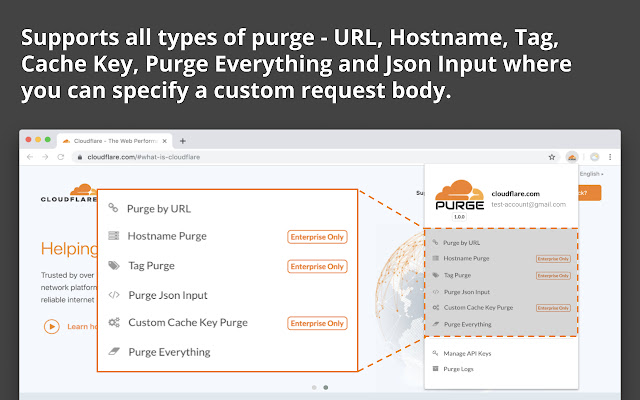
Cloudflare Purge Client allows you to purge Individual object(URL), hostname, tag, custom cache key, custom JSON input and everything at once.

You can manage multiple API keys and purge logs are available to check the result of the API call. Right-click to purge is also available for URL and Tag.

API Keys are encrypted and stored in local Chrome storage, it will not be synced throughout Chrome browsers, it will never be exposed to the internet.

In a few clicks, you will be able to make purge requests to Cloudflare!

Got feedback? email at [email protected]

Cloudflare and the Cloudflare logo are registered trademarks of Cloudflare, Inc. Cloudflare does not endorse, sponsor, or support this extension.
Základní Informace o Rozšíření
| Název |  Cloudflare Purge Client Cloudflare Purge Client |
| ID | nnliialngkpcpbokfdefifbhbhiaognn |
| Oficiální URL | https://chrome.google.com/webstore/detail/cloudflare-purge-client/nnliialngkpcpbokfdefifbhbhiaognn |
| Popis | Delete cache objects from Cloudflare network |
| Velikost souboru | 777 KB |
| Počet instalací | 341 |
| Aktuální Verze | 1.1.3 |
| Poslední Aktualizace | 2019-12-25 |
| Datum Vydání | 2019-12-25 |
| Hodnocení | 3.67/5 Celkem 3 Hodnocení |
| Vývojář | Ricky Yu |
| [email protected] | |
| Typ Platby | free |
| Podporované Jazyky | en |
| manifest.json | |
{
    "update_url": "https:\/\/clients2.google.com\/service\/update2\/crx",
    "name": "Cloudflare Purge Client",
    "version": "1.1.3",
    "description": "Delete cache objects from Cloudflare network",
    "manifest_version": 2,
    "background": {
        "persistent": false,
        "scripts": [
            "lib\/jquery-3.1.1.min.js",
            "lib\/core.js",
            "lib\/enc-base64.js",
            "lib\/md5.js",
            "lib\/evpkdf.js",
            "lib\/cipher-core.js",
            "lib\/aes.js",
            "js\/global_static.js",
            "js\/notification.js",
            "js\/utils.js",
            "js\/encdec.js",
            "js\/background.js",
            "js\/updatepage.js",
            "js\/apikey.js",
            "js\/purge.js",
            "js\/http.js",
            "js\/page.js",
            "pages\/manage_key.js",
            "pages\/mainpage.js",
            "pages\/purge_result.js",
            "pages\/purge_by_url.js",
            "pages\/purge_cache_key.js",
            "pages\/purge_json_input.js",
            "pages\/purge_by_host.js",
            "pages\/purge_by_tag.js",
            "pages\/purge_all.js",
            "pages\/purge_log.js"
        ]
    },
    "browser_action": {
        "default_icon": "img\/logo.png",
        "default_popup": "popup.html",
        "default_title": "Cloudflare Purge Client"
    },
    "icons": {
        "16": "img\/logo-white.png",
        "48": "img\/logo.png",
        "128": "img\/logo.png"
    },
    "permissions": [
        "tabs",
        "activeTab",
        "storage",
        "contextMenus",
        "notifications",
        "https:\/\/api.cloudflare.com\/*"
    ],
    "web_accessible_resources": [
        "css\/HoldOn.css"
    ]
} | |