Zaposta Chrome Extension
Shop and Ship from over a thousand shops and have it delivered to you in Nigeria
Hvad er Zaposta Chrome Extension?
Zaposta Chrome Extension er en Chrome-udvidelse udviklet af http://www.zaposta.com, og dens hovedfunktion er "Shop and Ship from over a thousand shops and have it delivered to you in Nigeria".
Udvidelsesskærmbilleder


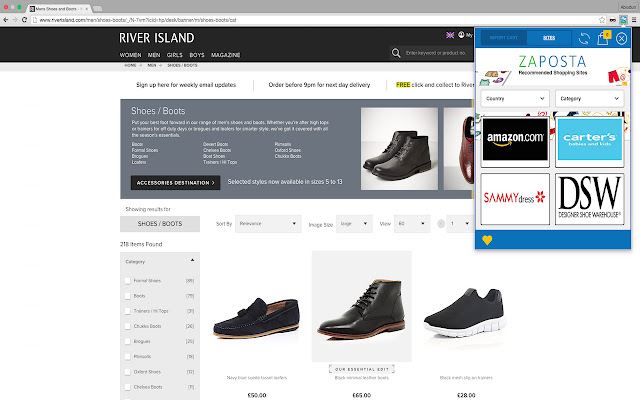

Download Zaposta Chrome Extension-udvidelses-CRX-fil
Download Zaposta Chrome Extension-udvidelsesfiler i crx-format, installer Chrome-udvidelser manuelt i browseren eller del crx-filer med venner for nemt at installere Chrome-udvidelser.
Brugsanvisning til Udvidelsen
An extension that automates making a shopping or shipping list on Zaposta.com. When users place orders or make shipment bookings on Zaposta.com, they can click on the extension to import their shopping cart from the international vendor website and recreate the list, including product images, on the Zaposta shopping cart. This removes the need to manually type and populate shopping cart list on the web application. Grundlæggende oplysninger om udvidelsen
| Navn |  Zaposta Chrome Extension Zaposta Chrome Extension |
| ID | apfmmeplcfanojoeaphhkiigkjemoodm |
| Officiel URL | https://chrome.google.com/webstore/detail/apfmmeplcfanojoeaphhkiigkjemoodm |
| Beskrivelse | Shop and Ship from over a thousand shops and have it delivered to you in Nigeria |
| Filstørrelse | 436 KB |
| Antal Installationer | 29 |
| Nuværende Version | 1.0.2.3 |
| Senest Opdateret | 2016-05-05 |
| Udgivelsesdato | 2016-05-05 |
| Bedømmelse | 5.00/5 Samlet 2 Bedømmelser |
| Udvikler | http://www.zaposta.com |
| Betalingsmetode | free |
| Udvidelseswebsted | http://www.zaposta.com |
| Hjælpeside-URL | http://www.zaposta.com/faq |
| Understøttede Sprog | en-GB |
| manifest.json | |
{
"update_url": "https:\/\/clients2.google.com\/service\/update2\/crx",
"name": "Zaposta Chrome Extension",
"short_name": "Zaposta",
"version": "1.0.2.3",
"manifest_version": 2,
"description": "Shop and Ship from over a thousand shops and have it delivered to you in Nigeria",
"icons": {
"16": "icons\/icon16.png",
"48": "icons\/icon48.png",
"128": "icons\/icon128.png"
},
"browser_action": {
"default_icon": "icons\/icon128.png",
"default_popup": "popup.html"
},
"web_accessible_resources": [
"img\/*"
],
"permissions": [
"tabs",
"storage",
" | |