Server Monitoring
Check whether servers are online or not and get notified via Notification Popups
Hvad er Server Monitoring?
Server Monitoring er en Chrome-udvidelse udviklet af limepix, og dens hovedfunktion er "Check whether servers are online or not and get notified via Notification Popups".
Udvidelsesskærmbilleder



Download Server Monitoring-udvidelses-CRX-fil
Download Server Monitoring-udvidelsesfiler i crx-format, installer Chrome-udvidelser manuelt i browseren eller del crx-filer med venner for nemt at installere Chrome-udvidelser.
Brugsanvisning til Udvidelsen
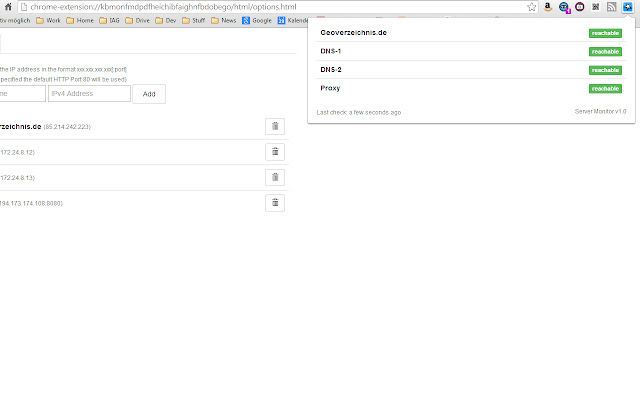
                        Server Monitoring is a simple to use Chrome Extension that monitors your server. All checks are mare completely on the client-side (in your browser) via JavaScript.

Checks are made every ten seconds.

If a server is not reachable for five times, you will receive a notification popup.

Enjoy and feel free to contact me for bugs or improvement ideas.
Grundlæggende oplysninger om udvidelsen
| Navn |  Server Monitoring Server Monitoring |
| ID | dcfclloijmpaechbnkbkcgfpakhjmoog |
| Officiel URL | https://chrome.google.com/webstore/detail/server-monitoring/dcfclloijmpaechbnkbkcgfpakhjmoog |
| Beskrivelse | Check whether servers are online or not and get notified via Notification Popups |
| Filstørrelse | 929 KB |
| Antal Installationer | 81 |
| Nuværende Version | 1.1 |
| Senest Opdateret | 2014-08-06 |
| Udgivelsesdato | 2014-08-06 |
| Udvikler | limepix |
| [email protected] | |
| Betalingsmetode | free |
| Understøttede Sprog | en |
| manifest.json | |
{
    "update_url": "https:\/\/clients2.google.com\/service\/update2\/crx",
    "manifest_version": 2,
    "name": "Server Monitoring",
    "short_name": "Server Monitoring",
    "description": "Check whether servers are online or not and get notified via Notification Popups",
    "version": "1.1",
    "permissions": [
        "webRequest",
        "http:\/\/*\/",
        "https:\/\/*\/",
        "notifications",
        "tabs"
    ],
    "background": {
        "scripts": [
            "js\/jquery.js",
            "js\/base.js",
            "js\/popup.js",
            "js\/background.js",
            "js\/moment.min.js"
        ]
    },
    "options_page": "html\/options.html",
    "browser_action": {
        "default_icon": {
            "19": "images\/logo_19.png",
            "38": "images\/logo_38.png",
            "48": "images\/logo_48.png"
        },
        "default_title": "Server Monitor",
        "default_popup": "html\/popup.html"
    }
} | |