Image Downloader
Easy download images while browsing on the web
Hvad er Image Downloader?
Image Downloader er en Chrome-udvidelse udviklet af Top Downloaders, og dens hovedfunktion er "Easy download images while browsing on the web".
Udvidelsesskærmbilleder
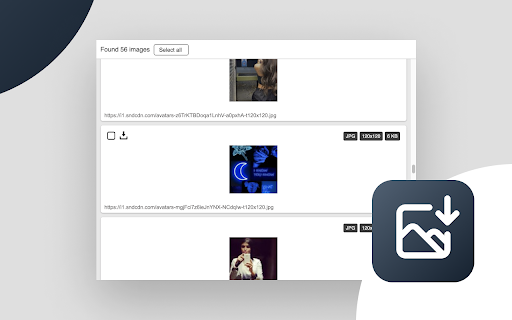
Download Image Downloader-udvidelses-CRX-fil
Download Image Downloader-udvidelsesfiler i crx-format, installer Chrome-udvidelser manuelt i browseren eller del crx-filer med venner for nemt at installere Chrome-udvidelser.
Brugsanvisning til Udvidelsen
                        How to use:
 - Go to the any website with images
 - Click on Image Downloader button in browser panel
 - Select image/images to download

Why this image downloader?
 - Unlimited downloads
 - No ads
 - No sponsored  links
 - Completely free
 - Download instantly at your highest speed
 - Works on multiple operating systems (Windows, Mac OS and Linux)
 - No need to install additional software


Features
With this Image Downloader you can find, browse and download all the images of any web page. In addition you can:

- Filter by  pixel width and height
- Bulk download all images in once
- Select what images you want to download
- Check the size of each image
- Copy the url of the original image
- Supporting all popular websites (Instagram, Facebook, Twitter, ...)
- Supports many formats including PNG, JPEG, SVG, WEBP

Powerful image downloader tool that enables you to download all images from any website, Google Images. Download all images from Pinterest and Instagram!

This extension will save you a lot of time if you need to download images regularly!

FAQ
Why does this extension need access to all my site data?
In order to extract images from a web page, Image Downloader needs to be able to read all the content on that web page when you open the popup. No data leaves your computer.

Why did this extension download smaller images than I expected? Why did it miss some images?
Image Downloader can only extract the images currently visible on the page. Those may sometimes be smaller thumbnails of the full-resolution images you'd expect to see when you click on a photo (e.g. in Facebook albums). In addition, some websites like Instagram have carousels with multiple images, but only load a few at a time to save bandwidth.
Grundlæggende oplysninger om udvidelsen
| Navn |  Image Downloader Image Downloader |
| ID | djlbpfldklgbbcndolfjibbhegnmnmho |
| Officiel URL | https://chromewebstore.google.com/detail/image-downloader/djlbpfldklgbbcndolfjibbhegnmnmho |
| Beskrivelse | Easy download images while browsing on the web |
| Filstørrelse | 256 KB |
| Antal Installationer | 77,244 |
| Nuværende Version | 1.0.0.3 |
| Senest Opdateret | 2023-12-01 |
| Udgivelsesdato | 2022-10-08 |
| Bedømmelse | 4.60/5 Samlet 10 Bedømmelser |
| Udvikler | Top Downloaders |
| [email protected] | |
| Betalingsmetode | free |
| URL til Fortrolighedspolitik Side | https://bit.ly/3SlA40W |
| Understøttede Sprog | en |
| manifest.json | |
{
    "update_url": "https:\/\/clients2.google.com\/service\/update2\/crx",
    "action": {
        "default_icon": "images\/icon-32.png",
        "default_popup": "popup.html",
        "default_title": "__MSG_appButtonDesc__"
    },
    "background": {
        "service_worker": "js\/background.js"
    },
    "content_security_policy": {
        "sandbox": "sandbox allow-forms allow-scripts; script-src 'self' 'unsafe-eval'; script-src-elem 'self'  blob: 'unsafe-inline' 'unsafe-eval'; child-src 'self'; object-src 'self'"
    },
    "default_locale": "en",
    "description": "__MSG_appDesc__",
    "host_permissions": [
        "http:\/\/*\/*",
        "https:\/\/*\/*"
    ],
    "icons": {
        "128": "images\/icon-128.png",
        "16": "images\/icon-16.png",
        "32": "images\/icon-32.png",
        "48": "images\/icon-64.png"
    },
    "manifest_version": 3,
    "name": "__MSG_appName__",
    "permissions": [
        "activeTab",
        "downloads",
        "storage",
        "webRequest",
        "scripting",
        "declarativeNetRequest",
        "cookies",
        "unlimitedStorage",
        "tabs",
        "declarativeNetRequestWithHostAccess"
    ],
    "sandbox": {
        "pages": [
            "js\/sandbox.html"
        ]
    },
    "version": "1.0.0.3",
    "web_accessible_resources": [
        {
            "matches": [
                "http:\/\/*\/*",
                "https:\/\/*\/*"
            ],
            "resources": [
                "js\/sandbox.html"
            ],
            "use_dynamic_url": true
        }
    ]
} | |