Reddit Top Comment
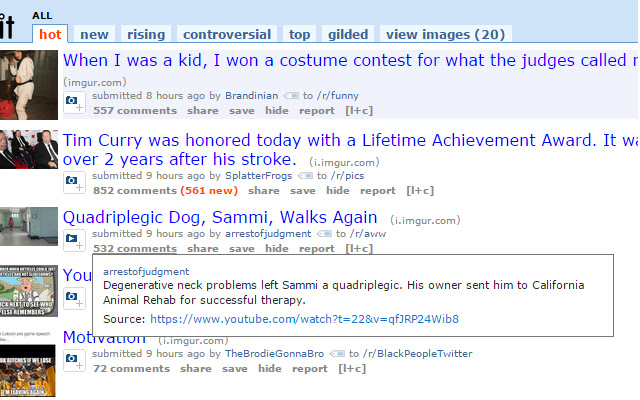
Shows the top comment when you hover over the comments link.
Hvad er Reddit Top Comment?
Reddit Top Comment er en Chrome-udvidelse udviklet af DiscoShady, og dens hovedfunktion er "Shows the top comment when you hover over the comments link.".
Udvidelsesskærmbilleder
Download Reddit Top Comment-udvidelses-CRX-fil
Download Reddit Top Comment-udvidelsesfiler i crx-format, installer Chrome-udvidelser manuelt i browseren eller del crx-filer med venner for nemt at installere Chrome-udvidelser.
Brugsanvisning til Udvidelsen
                        This simple and small Chrome Extension shows the top comment for a Reddit post when you hover over the comments link.
Compatible with Reddit Enhancement Suite.
-------
Any problems? Just message /u/DiscoShady on Reddit.com and i'll take a look!
Grundlæggende oplysninger om udvidelsen
| Navn |  Reddit Top Comment Reddit Top Comment |
| ID | dmpbhmingopjhhcppkbfedabmhiciinl |
| Officiel URL | https://chrome.google.com/webstore/detail/reddit-top-comment/dmpbhmingopjhhcppkbfedabmhiciinl |
| Beskrivelse | Shows the top comment when you hover over the comments link. |
| Filstørrelse | 53.25 KB |
| Antal Installationer | 23 |
| Nuværende Version | 1.0 |
| Senest Opdateret | 2015-06-09 |
| Udgivelsesdato | 2015-06-09 |
| Bedømmelse | 5.00/5 Samlet 1 Bedømmelser |
| Udvikler | DiscoShady |
| Betalingsmetode | free |
| Understøttede Sprog | en-US |
| manifest.json | |
{
    "update_url": "https:\/\/clients2.google.com\/service\/update2\/crx",
    "content_scripts": [
        {
            "js": [
                "jquery-1.6.4.min.js",
                "topcomment.js"
            ],
            "matches": [
                "http:\/\/reddit.com\/*",
                "https:\/\/reddit.com\/*",
                "http:\/\/*.reddit.com\/*",
                "https:\/\/*.reddit.com\/*"
            ]
        }
    ],
    "description": "Shows the top comment when you hover over the comments link.",
    "homepage_url": "http:\/\/reddit.com",
    "manifest_version": 2,
    "minimum_chrome_version": "20.0",
    "name": "Reddit Top Comment",
    "short_name": "Reddit Top",
    "permissions": [
        "tabs",
        "history",
        "http:\/\/reddit.com\/*",
        "https:\/\/reddit.com\/*",
        "http:\/\/*.reddit.com\/*",
        "https:\/\/*.reddit.com\/*"
    ],
    "version": "1.0",
    "icons": {
        "16": "images\/icon-16x16.png",
        "32": "images\/icon-32x32.png",
        "64": "images\/icon-64x64.png",
        "128": "images\/icon-128x128.png"
    }
} | |







![redd.AT - an [A]wesome [T]heme for reddit](https://lh3.googleusercontent.com/sPtma8dqc4jUEpdaHgAoUCH-TGNebKS1_MIGinMfi5566q3hdj-C9vYk6yleQHDROYYdvuyuRBozvHA-AxYNh2h-Ww)


