Grade Calculator for Blackboard Learn
Find out what your grade would be with certain assignments added.
Hvad er Grade Calculator for Blackboard Learn?
Grade Calculator for Blackboard Learn er en Chrome-udvidelse udviklet af Rohan Mathur, og dens hovedfunktion er "Find out what your grade would be with certain assignments added.".
Udvidelsesskærmbilleder

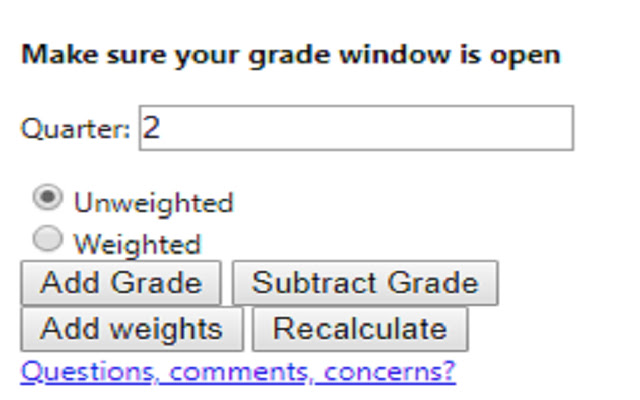
Download Grade Calculator for Blackboard Learn-udvidelses-CRX-fil
Download Grade Calculator for Blackboard Learn-udvidelsesfiler i crx-format, installer Chrome-udvidelser manuelt i browseren eller del crx-filer med venner for nemt at installere Chrome-udvidelser.
Brugsanvisning til Udvidelsen
                        **MAJOR UPDATE**
I MADE AN ACTUAL GUI!! This is now an actually usable chrome extension and something I'm actually kind of proud of. I hope everyone finds it useful!

Thanks,
Rohan

This extension is meant to help you figure out what your total grade would be after an assignment is entered into the grade book.

Feedback Form:
https://goo.gl/forms/1fpCghIIhv49VfTr1
Grundlæggende oplysninger om udvidelsen
| Navn |  Grade Calculator for Blackboard Learn Grade Calculator for Blackboard Learn |
| ID | eohcolhmjdncdmicjibnnjfocokolonj |
| Officiel URL | https://chrome.google.com/webstore/detail/grade-calculator-for-blac/eohcolhmjdncdmicjibnnjfocokolonj |
| Beskrivelse | Find out what your grade would be with certain assignments added. |
| Filstørrelse | 71.73 KB |
| Antal Installationer | 435 |
| Nuværende Version | 4.0.0 |
| Senest Opdateret | 2019-11-25 |
| Udgivelsesdato | 2019-11-21 |
| Bedømmelse | 5.00/5 Samlet 3 Bedømmelser |
| Udvikler | Rohan Mathur |
| Betalingsmetode | free |
| Hjælpeside-URL | https://goo.gl/forms/1fpCghIIhv49VfTr1 |
| Understøttede Sprog | en |
| manifest.json | |
{
    "update_url": "https:\/\/clients2.google.com\/service\/update2\/crx",
    "name": "Grade Calculator for Blackboard Learn",
    "version": "4.0.0",
    "manifest_version": 2,
    "description": "Find out what your grade would be with certain assignments added.",
    "browser_action": {
        "default_icon": "icon.png",
        "default_popup": "index.html"
    },
    "icons": {
        "16": "icon.png",
        "48": "icon.png",
        "128": "icon.png"
    },
    "permissions": [
        "tabs",
        "activeTab"
    ]
} | |