Salesforce Marketing Cloud - Email Downloader
Lets you download email from Marketing Cloud as HTML file.
Hvad er Salesforce Marketing Cloud - Email Downloader?
Salesforce Marketing Cloud - Email Downloader er en Chrome-udvidelse udviklet af Edmark Magsalin, og dens hovedfunktion er "Lets you download email from Marketing Cloud as HTML file.".
Udvidelsesskærmbilleder
Download Salesforce Marketing Cloud - Email Downloader-udvidelses-CRX-fil
Download Salesforce Marketing Cloud - Email Downloader-udvidelsesfiler i crx-format, installer Chrome-udvidelser manuelt i browseren eller del crx-filer med venner for nemt at installere Chrome-udvidelser.
Brugsanvisning til Udvidelsen
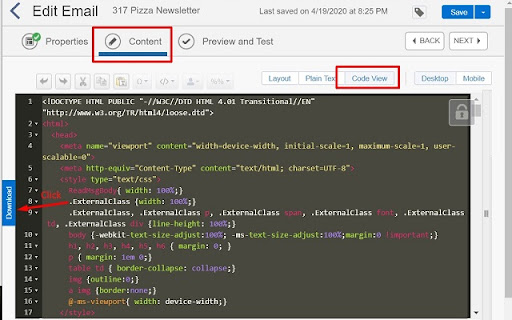
                        - Select and copy email codes inside MC
 - Make sure you are in the Content tab and Code View (if using template-based email)
 - Click the download button next to the codes
 - The download name should be same as the email name, in the screenshot's case, 317 Pizza Newsletter.html
Grundlæggende oplysninger om udvidelsen
| Navn | |
| ID | fagojbpakmkkdeomndkdlaolojmlgmak |
| Officiel URL | https://chromewebstore.google.com/detail/salesforce-marketing-clou/fagojbpakmkkdeomndkdlaolojmlgmak |
| Beskrivelse | Lets you download email from Marketing Cloud as HTML file. |
| Filstørrelse | 4.49 KB |
| Antal Installationer | 104 |
| Nuværende Version | 1.0 |
| Senest Opdateret | 2020-05-05 |
| Udgivelsesdato | 2020-05-05 |
| Udvikler | Edmark Magsalin |
| [email protected] | |
| Betalingsmetode | free |
| Understøttede Sprog | en |
| manifest.json | |
{
    "update_url": "https:\/\/clients2.google.com\/service\/update2\/crx",
    "name": "Salesforce Marketing Cloud - Email Downloader",
    "description": "Lets you download email from Marketing Cloud as HTML file.",
    "version": "1.0",
    "manifest_version": 2,
    "permissions": [
        "storage"
    ],
    "content_scripts": [
        {
            "matches": [
                "https:\/\/mc.s7.exacttarget.com\/*"
            ],
            "run_at": "document_end",
            "js": [
                "mc_script.js"
            ],
            "all_frames": true
        },
        {
            "matches": [
                "https:\/\/content-builder.s7.marketingcloudapps.com\/*"
            ],
            "run_at": "document_end",
            "js": [
                "content-builder_script.js"
            ],
            "all_frames": true
        }
    ]
} | |