URL Alias
URL Alias allows the user to define a short alias for a url, in order to access websites faster.
Hvad er URL Alias?
URL Alias er en Chrome-udvidelse udviklet af Merve Sahin, og dens hovedfunktion er "URL Alias allows the user to define a short alias for a url, in order to access websites faster.".
Udvidelsesskærmbilleder

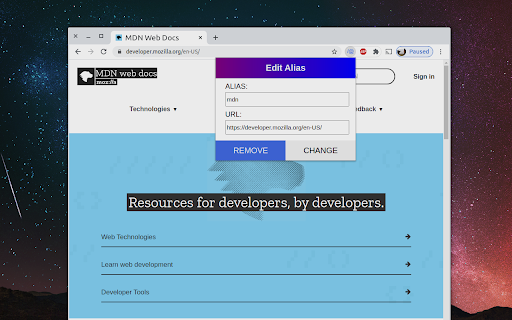
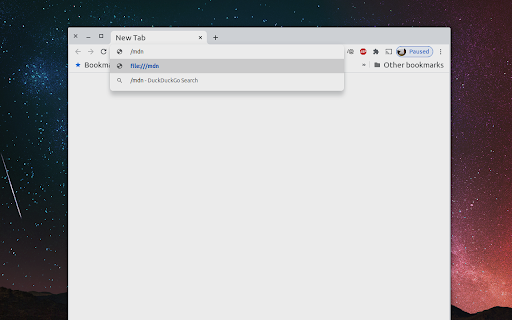
Download URL Alias-udvidelses-CRX-fil
Download URL Alias-udvidelsesfiler i crx-format, installer Chrome-udvidelser manuelt i browseren eller del crx-filer med venner for nemt at installere Chrome-udvidelser.
Brugsanvisning til Udvidelsen
                        URL Alias allows users to define simple aliases for urls, in order to access websites faster from the address bar.

- Users are able to create aliases the same way they can create bookmarks: with a button on the address bar.
- When entering the alias in the address bar, it needs to be prefixed with a slash (/).
- Existing aliases can be viewed & edited by opening the extensions popup in the address bar and clicking 'My aliases'
Grundlæggende oplysninger om udvidelsen
| Navn |  URL Alias URL Alias |
| ID | fchefaeihhednjnhhpfffibfbojdcmhk |
| Officiel URL | https://chromewebstore.google.com/detail/url-alias/fchefaeihhednjnhhpfffibfbojdcmhk |
| Beskrivelse | URL Alias allows the user to define a short alias for a url, in order to access websites faster. |
| Filstørrelse | 94.77 KB |
| Antal Installationer | 215 |
| Nuværende Version | 1.5 |
| Senest Opdateret | 2022-03-08 |
| Udgivelsesdato | 2020-09-06 |
| Bedømmelse | 2.33/5 Samlet 3 Bedømmelser |
| Udvikler | Merve Sahin |
| [email protected] | |
| Betalingsmetode | free |
| Udvidelseswebsted | https://github.com/Merve40/url-alias |
| Hjælpeside-URL | https://github.com/Merve40/url-alias |
| Understøttede Sprog | en |
| manifest.json | |
{
    "update_url": "https:\/\/clients2.google.com\/service\/update2\/crx",
    "name": "URL Alias",
    "description": "URL Alias allows the user to define a short alias for a url, in order to access websites faster.",
    "homepage_url": "https:\/\/github.com\/merve40\/url-alias",
    "version": "1.5",
    "manifest_version": 2,
    "permissions": [
        "storage",
        "tabs",
        "webNavigation"
    ],
    "background": {
        "scripts": [
            "browser-polyfill.min.js",
            "util.js",
            "background.js"
        ]
    },
    "icons": {
        "48": "icons\/ic_48.png",
        "128": "icons\/ic_128.png"
    },
    "page_action": {
        "default_icon": "icons\/ic_128.png",
        "default_title": "URL Alias",
        "default_popup": "popup.html"
    },
    "browser_specific_settings": {
        "gecko": {
            "id": "[email protected]",
            "strict_min_version": "65.0"
        }
    }
} | |