Midicast
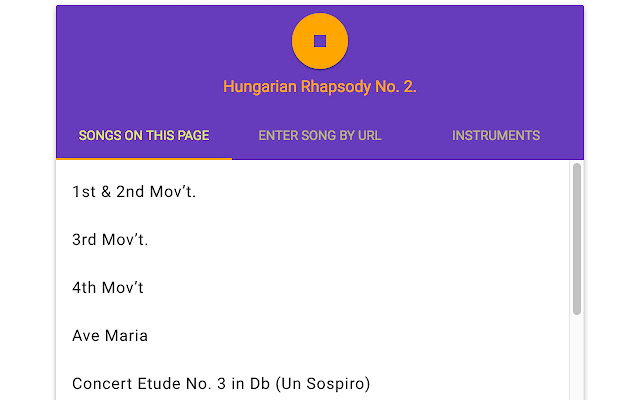
Midicast is an extension that streams songs from a web page to a MIDI instrument like a piano. Midicast scans the page you're on…
Hvad er Midicast?
Midicast er en Chrome-udvidelse udviklet af appsforartists, og dens hovedfunktion er "Midicast is an extension that streams songs from a web page to a MIDI instrument like a piano. Midicast scans the page you're on…".
Udvidelsesskærmbilleder
Download Midicast-udvidelses-CRX-fil
Download Midicast-udvidelsesfiler i crx-format, installer Chrome-udvidelser manuelt i browseren eller del crx-filer med venner for nemt at installere Chrome-udvidelser.
Brugsanvisning til Udvidelsen
                        Midicast is an extension that streams songs from a web page to a MIDI instrument like a piano.


Midicast scans the page you're on for MIDI links. Whatever it finds will show up in a list in the extension. Click one of the songs in the extension to start playing it. Midicast should work with any instrument that accepts MIDI input, such as a Yamaha Disklavier® player piano.


This is a gift to my family.  Eventually, I might document it better and add more features, but for now, I just want to put it somewhere they can use it.

Source is available here: https://github.com/appsforartists/midicast/
Grundlæggende oplysninger om udvidelsen
| Navn |  Midicast Midicast |
| ID | fjnaegdodddmdifncleeakgdblhdoapg |
| Officiel URL | https://chrome.google.com/webstore/detail/midicast/fjnaegdodddmdifncleeakgdblhdoapg |
| Beskrivelse | Midicast is an extension that streams songs from a web page to a MIDI instrument like a piano. Midicast scans the page you're on… |
| Filstørrelse | 646 KB |
| Antal Installationer | 364 |
| Nuværende Version | 0.1.1 |
| Senest Opdateret | 2017-08-11 |
| Udgivelsesdato | 2017-08-11 |
| Bedømmelse | 1.00/5 Samlet 1 Bedømmelser |
| Udvikler | appsforartists |
| Betalingsmetode | free |
| Udvidelseswebsted | https://github.com/appsforartists/midicast/ |
| Hjælpeside-URL | https://github.com/appsforartists/midicast/issues/ |
| Understøttede Sprog | en |
| manifest.json | |
{
    "update_url": "https:\/\/clients2.google.com\/service\/update2\/crx",
    "manifest_version": 2,
    "name": "Midicast",
    "version": "0.1.1",
    "background": {
        "page": "pages\/index.html"
    },
    "browser_action": {
        "default_icon": "icons\/noto-piano.png",
        "default_popup": "pages\/index.html"
    },
    "icons": {
        "128": "icons\/noto-piano.png"
    },
    "permissions": [
        "activeTab"
    ]
} | |