Chat Saver
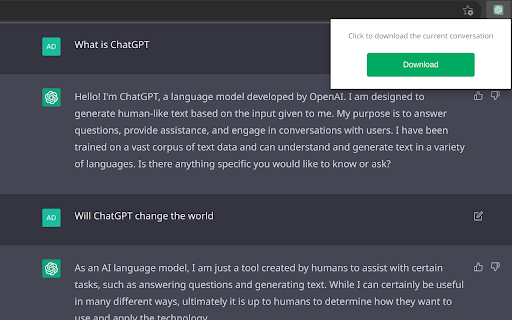
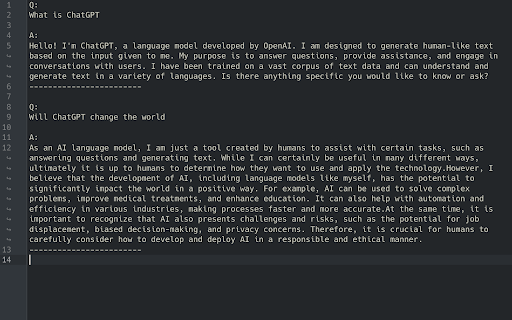
A browser extension that allows you to save the current chat history of ChatGPT to your local device.
Hvad er Chat Saver?
Chat Saver er en Chrome-udvidelse udviklet af Taipa Xu, og dens hovedfunktion er "A browser extension that allows you to save the current chat history of ChatGPT to your local device.".
Udvidelsesskærmbilleder
Download Chat Saver-udvidelses-CRX-fil
Download Chat Saver-udvidelsesfiler i crx-format, installer Chrome-udvidelser manuelt i browseren eller del crx-filer med venner for nemt at installere Chrome-udvidelser.
Brugsanvisning til Udvidelsen
A browser extension that allows you to save the current chat history of ChatGPT to your local device. Grundlæggende oplysninger om udvidelsen
| Navn |  Chat Saver Chat Saver |
| ID | gbccnnpigcfcheaeicpldgmjjojjmldb |
| Officiel URL | https://chromewebstore.google.com/detail/chat-saver/gbccnnpigcfcheaeicpldgmjjojjmldb |
| Beskrivelse | A browser extension that allows you to save the current chat history of ChatGPT to your local device. |
| Filstørrelse | 37.18 KB |
| Antal Installationer | 47 |
| Nuværende Version | 0.2.1 |
| Senest Opdateret | 2023-05-08 |
| Udgivelsesdato | 2023-03-09 |
| Udvikler | Taipa Xu |
| [email protected] | |
| Betalingsmetode | free |
| Udvidelseswebsted | https://github.com/TaipaXu/chat-saver |
| Hjælpeside-URL | https://github.com/TaipaXu/chat-saver |
| Understøttede Sprog | en |
| manifest.json | |
{
    "update_url": "https:\/\/clients2.google.com\/service\/update2\/crx",
    "manifest_version": 3,
    "name": "Chat Saver",
    "version": "0.2.1",
    "description": "A browser extension that allows you to save the current chat history of ChatGPT to your local device.",
    "icons": {
        "16": ".\/assets\/icon.png",
        "48": ".\/assets\/icon.png",
        "128": ".\/assets\/icon.png"
    },
    "action": {
        "default_icon": {
            "16": ".\/assets\/icon.png",
            "24": ".\/assets\/icon.png",
            "32": ".\/assets\/icon.png"
        },
        "default_title": "chat saver",
        "default_popup": "popup.html"
    },
    "background": {
        "type": "module",
        "service_worker": "service.js"
    },
    "permissions": [
        "tabs",
        "scripting"
    ],
    "host_permissions": [
        "https:\/\/chat.openai.com\/"
    ]
} | |