Goodlink
A direct link to Goodreads from Amazon.
Hvad er Goodlink?
Goodlink er en Chrome-udvidelse udviklet af Ratik Sharma, og dens hovedfunktion er "A direct link to Goodreads from Amazon.".
Udvidelsesskærmbilleder


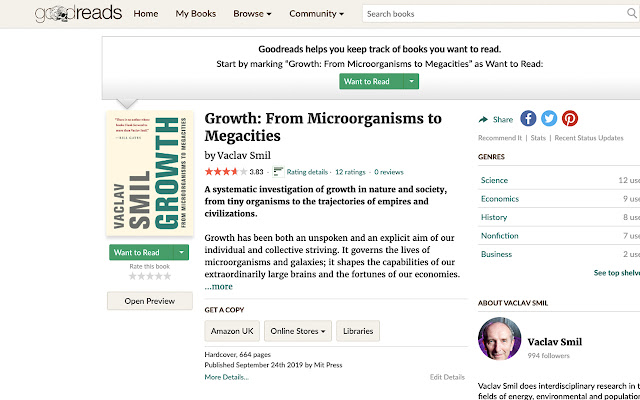
Download Goodlink-udvidelses-CRX-fil
Download Goodlink-udvidelsesfiler i crx-format, installer Chrome-udvidelser manuelt i browseren eller del crx-filer med venner for nemt at installere Chrome-udvidelser.
Brugsanvisning til Udvidelsen
                        Amazon is the go-to place people use to link to books on the internet. It makes sense that we do this since it makes it buying books easy. But, what if you don't want to buy the book right away and instead want to save it to your reading list on Goodreads?

Well, the way you would usually do that is by opening Goodreads, searching for the book, and then adding it to your lists. That is fairly long process. Goodlink wants to make this process faster.

With Goodlink, all you need to do is press the Goodlink button when on a book's page on Amazon and you will be taken to the book's Goodreads page instantly. You can then proceed and save the book to your lists as usual!
Grundlæggende oplysninger om udvidelsen
| Navn |  Goodlink Goodlink |
| ID | gfbllmckkfbnjjiglmffnloiihjccljh |
| Officiel URL | https://chrome.google.com/webstore/detail/gfbllmckkfbnjjiglmffnloiihjccljh |
| Beskrivelse | A direct link to Goodreads from Amazon. |
| Filstørrelse | 19.42 KB |
| Antal Installationer | 14 |
| Nuværende Version | 1.1.0 |
| Senest Opdateret | 2020-11-30 |
| Udgivelsesdato | 2019-10-06 |
| Bedømmelse | 5.00/5 Samlet 1 Bedømmelser |
| Udvikler | Ratik Sharma |
| [email protected] | |
| Betalingsmetode | free |
| Understøttede Sprog | en |
| manifest.json | |
{
    "update_url": "https:\/\/clients2.google.com\/service\/update2\/crx",
    "manifest_version": 2,
    "name": "Goodlink",
    "version": "1.1.0",
    "description": "A direct link to Goodreads from Amazon.",
    "browser_action": {
        "default_icon": {
            "16": "icons\/grayed.png",
            "48": "icons\/[email protected]",
            "128": "icons\/[email protected]"
        }
    },
    "icons": {
        "16": "icons\/grayed.png",
        "48": "icons\/[email protected]",
        "128": "icons\/[email protected]"
    },
    "background": {
        "scripts": [
            "background.js"
        ]
    },
    "content_scripts": [
        {
            "matches": [
                "*:\/\/*.amazon.in\/*",
                "*:\/\/*.amazon.cn\/*",
                "*:\/\/*.amazon.co.jp\/*",
                "*:\/\/*.amazon.com.tr\/*",
                "*:\/\/*.amazon.ae\/*",
                "*:\/\/*.amazon.fr\/*",
                "*:\/\/*.amazon.de\/*",
                "*:\/\/*.amazon.it\/*",
                "*:\/\/*.amazon.nl\/*",
                "*:\/\/*.amazon.es\/*",
                "*:\/\/*.amazon.co.uk\/*",
                "*:\/\/*.amazon.ca\/*",
                "*:\/\/*.amazon.com.mx\/*",
                "*:\/\/*.amazon.com\/*",
                "*:\/\/*.amazon.com.au\/*",
                "*:\/\/*.amazon.com.br\/*"
            ],
            "js": [
                "content.js"
            ]
        }
    ],
    "permissions": [
        "tabs",
        "*:\/\/*.goodreads.com\/*"
    ],
    "web_accessible_resources": [
        "*"
    ]
} | |