New Tab Tools
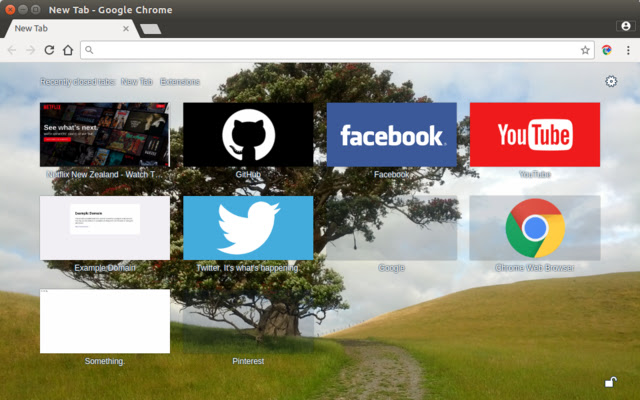
Customizes the new tab page. You can add more tiles, or a background image. And you can set new tile images and titles.
Hvad er New Tab Tools?
New Tab Tools er en Chrome-udvidelse udviklet af Geoff Lankow, og dens hovedfunktion er "Customizes the new tab page. You can add more tiles, or a background image. And you can set new tile images and titles.".
Udvidelsesskærmbilleder
Download New Tab Tools-udvidelses-CRX-fil
Download New Tab Tools-udvidelsesfiler i crx-format, installer Chrome-udvidelser manuelt i browseren eller del crx-filer med venner for nemt at installere Chrome-udvidelser.
Brugsanvisning til Udvidelsen
Customizes the new tab page. You can add more tiles, or a background image. And you can set new tile images and titles. Grundlæggende oplysninger om udvidelsen
| Navn |  New Tab Tools New Tab Tools |
| ID | gfonmeedigdbjpgpeojioadpimflbogh |
| Officiel URL | https://chrome.google.com/webstore/detail/new-tab-tools/gfonmeedigdbjpgpeojioadpimflbogh |
| Beskrivelse | Customizes the new tab page. You can add more tiles, or a background image. And you can set new tile images and titles. |
| Filstørrelse | 174 KB |
| Antal Installationer | 1,000 |
| Nuværende Version | 90.3 |
| Senest Opdateret | 2019-12-12 |
| Udgivelsesdato | 2019-12-11 |
| Bedømmelse | 4.29/5 Samlet 34 Bedømmelser |
| Udvikler | Geoff Lankow |
| Betalingsmetode | free |
| Udvidelseswebsted | https://github.com/darktrojan/newtabtools |
| Hjælpeside-URL | https://github.com/darktrojan/newtabtools/issues |
| Understøttede Sprog | de,en,fr,nl,ca,es,it,lv,hu,pl,el,bg,ru,uk,ja,ko |
| manifest.json | |
{
"update_url": "https:\/\/clients2.google.com\/service\/update2\/crx",
"name": "__MSG_extensionName__",
"description": "__MSG_extensionDescription__",
"version": "90.3",
"icons": {
"16": "images\/icon16.png",
"24": "images\/icon24.png",
"32": "images\/icon32.png",
"48": "images\/icon48.png",
"64": "images\/icon64.png",
"96": "images\/icon96.png"
},
"chrome_url_overrides": {
"newtab": "newTab.xhtml"
},
"background": {
"scripts": [
"common.js",
"tiles.js",
"prefs.js",
"background.js",
"lib\/zip.js",
"export.js"
]
},
"browser_action": {
"default_icon": {
"16": "images\/tools-light16.png",
"24": "images\/tools-light24.png",
"32": "images\/tools-light32.png",
"48": "images\/tools-light48.png",
"64": "images\/tools-light64.png",
"96": "images\/tools-light96.png"
},
"default_popup": "action.html",
"default_title": "__MSG_extensionName__",
"browser_style": true
},
"permissions": [
" | |