Cockatoo
Secure password aggregator.
Hvad er Cockatoo?
Cockatoo er en Chrome-udvidelse udviklet af https://cctoo.org, og dens hovedfunktion er "Secure password aggregator.".
Udvidelsesskærmbilleder


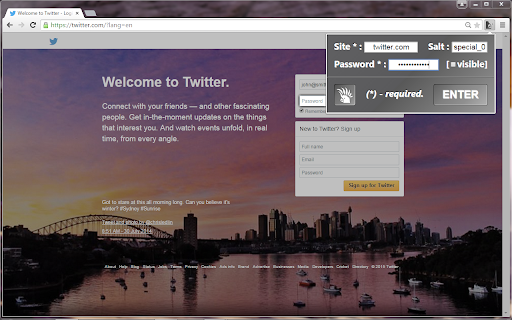
Download Cockatoo-udvidelses-CRX-fil
Download Cockatoo-udvidelsesfiler i crx-format, installer Chrome-udvidelser manuelt i browseren eller del crx-filer med venner for nemt at installere Chrome-udvidelser.
Brugsanvisning til Udvidelsen
Secure password aggregator - a simple tool that can derive strong passwords for your numerous web accounts. From now on a single secret gesture is all you need to remember. By using a cryptographic hash function and additional information you provide (the site name and, optionally, the hash salt), this extension turns your single secret gesture (or a master-password) into a particular password for any website you need. Then, it just puts the result in an active input field in your open browser tab. Everything works in a fully autonomous manner on your device - it doesn't keep information neither locally nor sends it anywhere. Grundlæggende oplysninger om udvidelsen
| Navn |  Cockatoo Cockatoo |
| ID | hbalpgjjkdhnenebiafhnjmcpjnmhpkh |
| Officiel URL | https://chromewebstore.google.com/detail/cockatoo/hbalpgjjkdhnenebiafhnjmcpjnmhpkh |
| Beskrivelse | Secure password aggregator. |
| Filstørrelse | 411 KB |
| Antal Installationer | 43 |
| Nuværende Version | 4.4 |
| Senest Opdateret | 2021-06-03 |
| Udgivelsesdato | 2019-09-28 |
| Bedømmelse | 5.00/5 Samlet 2 Bedømmelser |
| Udvikler | https://cctoo.org |
| [email protected] | |
| Betalingsmetode | free |
| Udvidelseswebsted | https://cctoo.org/ccstart.html |
| Hjælpeside-URL | https://cctoo.org/autnotes.html |
| URL til Fortrolighedspolitik Side | http://cctoo.org/ppolicy.html |
| Understøttede Sprog | en |
| manifest.json | |
{
    "update_url": "https:\/\/clients2.google.com\/service\/update2\/crx",
    "manifest_version": 2,
    "name": "Cockatoo",
    "short_name": "Cockatoo",
    "description": "Secure password aggregator.",
    "author": "Alex Anderson",
    "version": "4.4",
    "icons": {
        "16": "icon16m.png",
        "48": "icon48.png",
        "128": "icon128.png"
    },
    "browser_action": {
        "default_icon": {
            "19": "icon19m.png",
            "38": "icon38m.png"
        },
        "default_title": "Cockatoo",
        "default_popup": "cockatoo.html"
    },
    "options_ui": {
        "page": "options.html",
        "chrome_style": true
    },
    "permissions": [
        "http:\/\/*\/",
        "https:\/\/*\/",
        "activeTab"
    ]
} | |