Visual notifications
This extension shows a visual notification when inactive tab plays sound.
Hvad er Visual notifications?
Visual notifications er en Chrome-udvidelse udviklet af Łukasz Gruszka, og dens hovedfunktion er "This extension shows a visual notification when inactive tab plays sound.".
Udvidelsesskærmbilleder
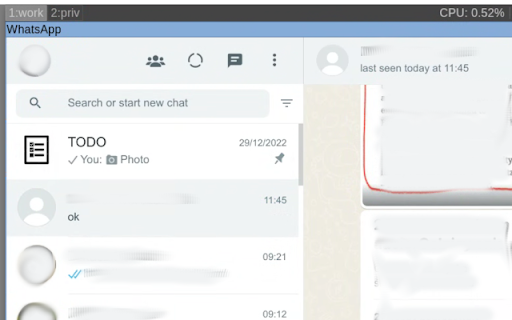
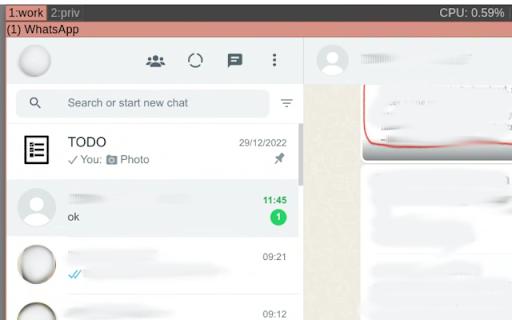
Download Visual notifications-udvidelses-CRX-fil
Download Visual notifications-udvidelsesfiler i crx-format, installer Chrome-udvidelser manuelt i browseren eller del crx-filer med venner for nemt at installere Chrome-udvidelser.
Brugsanvisning til Udvidelsen
                        This is a simple extension that is monitoring tab activity. When the tab state was changed to audible (i.e. when tab started to play sound), tab's window will be notified with "drawAttention: true", operating system will mark the window state as URGENT and the button in a task bar will start blinking.

Usage:
- when there is a web chat client (e.g. whatsapp) and user wants to have visual notification in addition to sound notification,
- when some tab starts playing sound and user wants to find it quickly.

Note that this extension works only with Linux operating system.
Grundlæggende oplysninger om udvidelsen
| Navn |  Visual notifications Visual notifications |
| ID | hccnejohbgldakdfachpcodflnplbmfo |
| Officiel URL | https://chromewebstore.google.com/detail/visual-notifications/hccnejohbgldakdfachpcodflnplbmfo |
| Beskrivelse | This extension shows a visual notification when inactive tab plays sound. |
| Filstørrelse | 11.97 KB |
| Antal Installationer | 187 |
| Nuværende Version | 1.0.1 |
| Senest Opdateret | 2023-12-09 |
| Udgivelsesdato | 2017-05-18 |
| Bedømmelse | 3.67/5 Samlet 3 Bedømmelser |
| Udvikler | Łukasz Gruszka |
| [email protected] | |
| Betalingsmetode | free |
| Understøttede Sprog | en |
| manifest.json | |
{
    "update_url": "https:\/\/clients2.google.com\/service\/update2\/crx",
    "manifest_version": 2,
    "name": "Visual notifications",
    "description": "This extension shows a visual notification when inactive tab plays sound.",
    "version": "1.0.1",
    "icons": {
        "128": "icon128.png"
    },
    "background": {
        "scripts": [
            "eventPage.js"
        ],
        "persistent": false
    }
} | |