Microsoft Surface New Tab
Stay connected with Surface with this official extension from Microsoft.
Hvad er Microsoft Surface New Tab?
Microsoft Surface New Tab er en Chrome-udvidelse udviklet af Microsoft Corporation, og dens hovedfunktion er "Stay connected with Surface with this official extension from Microsoft.".
Udvidelsesskærmbilleder



Download Microsoft Surface New Tab-udvidelses-CRX-fil
Download Microsoft Surface New Tab-udvidelsesfiler i crx-format, installer Chrome-udvidelser manuelt i browseren eller del crx-filer med venner for nemt at installere Chrome-udvidelser.
Brugsanvisning til Udvidelsen
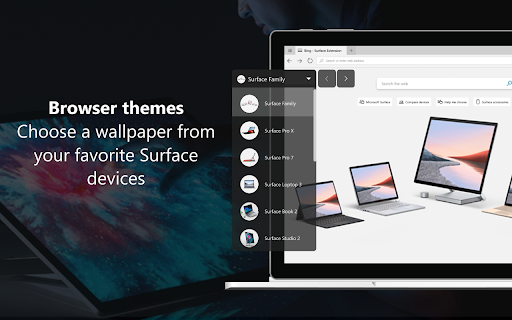
                        With new wallpapers, new shopping features, and device comparison tools -- add this extension to stay up to date with the latest updates from Surface.

Explore devices with browser themes from:
•	Surface Pro X
•	Surface Pro 7
•	Surface Laptop 3
•	Surface Book 3
•	Surface Go 2
•	Surface Studio 2

Get helpful links to guide your shopping experience:
•	Compare devices
•	Browse new accessories
•	Learn more about Surface for business


Bonus – sign in to a Microsoft Rewards account and search on Bing using this extension to earn and redeem points for Microsoft gift cards, sweepstakes and more.
Grundlæggende oplysninger om udvidelsen
| Navn |  Microsoft Surface New Tab Microsoft Surface New Tab |
| ID | hjjkehbmgocookeooljijcgbjdnaokin |
| Officiel URL | https://chromewebstore.google.com/detail/microsoft-surface-new-tab/hjjkehbmgocookeooljijcgbjdnaokin |
| Beskrivelse | Stay connected with Surface with this official extension from Microsoft. |
| Filstørrelse | 155 KB |
| Antal Installationer | 736 |
| Nuværende Version | 0.0.0.10 |
| Senest Opdateret | 2021-06-18 |
| Udgivelsesdato | 2020-09-18 |
| Bedømmelse | 3.67/5 Samlet 3 Bedømmelser |
| Udvikler | Microsoft Corporation |
| [email protected] | |
| Betalingsmetode | free |
| URL til Fortrolighedspolitik Side | https://go.microsoft.com/fwlink?LinkId=521839 |
| Understøttede Sprog | en |
| manifest.json | |
{
    "background": {
        "persistent": false,
        "scripts": [
            "background.js",
            "ping.js",
            "notifications.js",
            "onMessage.js"
        ]
    },
    "browser_action": {
        "default_icon": {
            "16": "images\/16x16.png",
            "32": "images\/32x32.png"
        }
    },
    "chrome_url_overrides": {
        "newtab": "newtab.html"
    },
    "default_locale": "en",
    "description": "__MSG_ExtensionDescription__",
    "externally_connectable": {
        "matches": [
            "https:\/\/*.msn.com\/*",
            "https:\/\/*.microsoft.com\/*",
            "https:\/\/*.bing.com\/*"
        ]
    },
    "icons": {
        "128": "images\/128x128.png",
        "16": "images\/16x16.png",
        "32": "images\/32x32.png",
        "48": "images\/48x48.png"
    },
    "manifest_version": 2,
    "name": "__MSG_ExtensionName__",
    "permissions": [
        "cookies",
        "management",
        "https:\/\/*\/*",
        "notifications"
    ],
    "optional_permissions": [
        "topSites"
    ],
    "short_name": "__MSG_ExtensionShortName__",
    "update_url": "https:\/\/clients2.google.com\/service\/update2\/crx",
    "version": "0.0.0.10"
} | |