Simple Tab Suspender
A simple tab suspender to suspend inactive tabs and stop using your computer resources.
Hvad er Simple Tab Suspender?
Simple Tab Suspender er en Chrome-udvidelse udviklet af nurubry29, og dens hovedfunktion er "A simple tab suspender to suspend inactive tabs and stop using your computer resources.".
Udvidelsesskærmbilleder


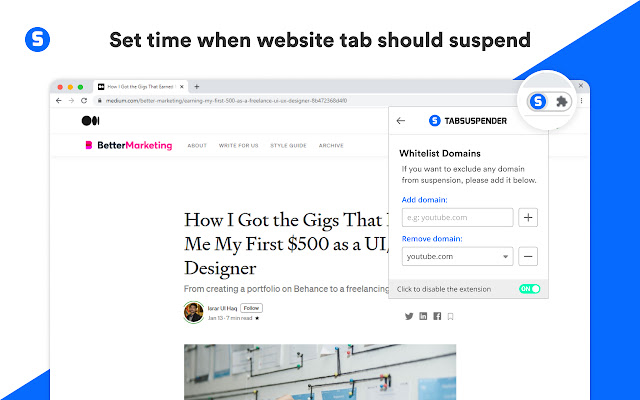
Download Simple Tab Suspender-udvidelses-CRX-fil
Download Simple Tab Suspender-udvidelsesfiler i crx-format, installer Chrome-udvidelser manuelt i browseren eller del crx-filer med venner for nemt at installere Chrome-udvidelser.
Brugsanvisning til Udvidelsen
                        A simple tab suspender to suspend inactive tabs and stop using your computer resources.

Simple Tab Suspender acts as a tab suspender and a tab manager for the google chrome browser. An automation extension that helps you manage your open tabs effectively, making it easy to control the tab count and process usage on your computer. Super helpful for anyone used to opening way too many tabs at once while working or studying online. It will automatically suspend tabs which are not being used by using advanced tab management technology.

It suspends tab intelligently according to the time settings you choose. The tabs do not need to appear visible or loaded in order for Simple Tab Suspender to suspend them. Tab suspension occurs as soon as tab is unused for a specific time. So tab suspension does not depend on tab loading status or tab visibility.
Simple Tab Suspender comes in help by automatically suspending tabs which are not being used but using advanced technology to do this. Not just by suspending the tabs but by monitoring and listening the tabs that are not being used and intelligently suspending those.

With this chrome tab suspender, you have multiple time settings to choose from after which suspension will occur on inactive tabs. It can check all open tabs every 15 min, 30 min, 1hr, 2hr, 3hr, 5hr and 10hrs according to the time setting you choose. The tab suspender is smart enough to know which tab needs to be suspended after your specified time. Depending on tab usage, tabs are suspended.

Simple Tab Suspender lets you manage your tabs easily. It helps you get rid of unwanted tabs and keep those that are useful.
Grundlæggende oplysninger om udvidelsen
| Navn |  Simple Tab Suspender Simple Tab Suspender |
| ID | iceofolgiblcopdbdpconajapemjhelm |
| Officiel URL | https://chrome.google.com/webstore/detail/iceofolgiblcopdbdpconajapemjhelm |
| Beskrivelse | A simple tab suspender to suspend inactive tabs and stop using your computer resources. |
| Filstørrelse | 120 KB |
| Antal Installationer | 3,207 |
| Nuværende Version | 1.7.0 |
| Senest Opdateret | 2022-07-19 |
| Udgivelsesdato | 2021-04-12 |
| Bedømmelse | 4.42/5 Samlet 19 Bedømmelser |
| Udvikler | nurubry29 |
| [email protected] | |
| Betalingsmetode | free |
| Understøttede Sprog | en |
| manifest.json | |
{
    "update_url": "https:\/\/clients2.google.com\/service\/update2\/crx",
    "manifest_version": 2,
    "name": "Simple Tab Suspender",
    "description": "A simple tab suspender to suspend inactive tabs and stop using your computer resources.",
    "version": "1.7.0",
    "icons": {
        "16": "icons\/icon16.png",
        "19": "icons\/icon19.png",
        "32": "icons\/icon32.png",
        "38": "icons\/icon38.png",
        "48": "icons\/icon48.png",
        "96": "icons\/icon96.png",
        "128": "icons\/icon128.png",
        "256": "icons\/icon256.png"
    },
    "background": {
        "persistent": true,
        "scripts": [
            "background.js"
        ]
    },
    "web_accessible_resources": [
        "suspended-page.html"
    ],
    "browser_action": {
        "default_title": "Tab suspender popup",
        "default_popup": "popup\/popup.html"
    },
    "permissions": [
        "storage",
        "tabs",
        "activeTab",
        "webRequest",
        "webRequestBlocking",
        "*:\/\/*\/*"
    ],
    "content_scripts": [
        {
            "matches": [
                "*:\/\/*\/*"
            ],
            "js": [
                "content-scripts\/idle.js"
            ],
            "all_frames": true,
            "run_at": "document_idle"
        },
        {
            "matches": [
                "*:\/\/*\/*"
            ],
            "js": [
                "content-scripts\/start.js"
            ],
            "all_frames": true,
            "run_at": "document_start"
        }
    ]
} | |