magicJack Voicemail for Gmail
Add Caller ID to magicJack voicemails in Gmail using your Google Contacts.
Hvad er magicJack Voicemail for Gmail?
magicJack Voicemail for Gmail er en Chrome-udvidelse udviklet af Galego Labs, og dens hovedfunktion er "Add Caller ID to magicJack voicemails in Gmail using your Google Contacts.".
Udvidelsesskærmbilleder
Download magicJack Voicemail for Gmail-udvidelses-CRX-fil
Download magicJack Voicemail for Gmail-udvidelsesfiler i crx-format, installer Chrome-udvidelser manuelt i browseren eller del crx-filer med venner for nemt at installere Chrome-udvidelser.
Brugsanvisning til Udvidelsen
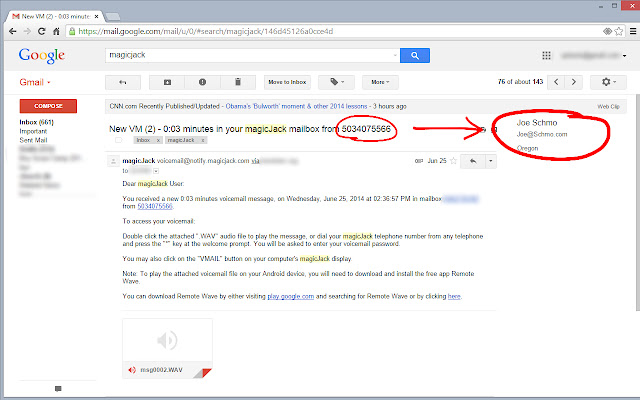
                        Display caller details on magicJack voicemails in your Gmail inbox.  (Only works for U.S. phone numbers.)

Google Contacts
Show caller's name and email address from Contacts.

Area Code Location
Display the state associated with the phone number.
Grundlæggende oplysninger om udvidelsen
| Navn |  magicJack Voicemail for Gmail magicJack Voicemail for Gmail |
| ID | ifmfendfbkhapjjicbinoaoppfkjhooa |
| Officiel URL | https://chrome.google.com/webstore/detail/magicjack-voicemail-for-g/ifmfendfbkhapjjicbinoaoppfkjhooa |
| Beskrivelse | Add Caller ID to magicJack voicemails in Gmail using your Google Contacts. |
| Filstørrelse | 145 KB |
| Antal Installationer | 501 |
| Nuværende Version | 1.0 |
| Senest Opdateret | 2015-02-02 |
| Udgivelsesdato | 2015-02-02 |
| Bedømmelse | 4.00/5 Samlet 4 Bedømmelser |
| Udvikler | Galego Labs |
| Betalingsmetode | free |
| Understøttede Sprog | en-US |
| manifest.json | |
{
    "update_url": "https:\/\/clients2.google.com\/service\/update2\/crx",
    "name": "magicJack Voicemail for Gmail",
    "short_name": "mjvm4g",
    "description": "Add Caller ID to magicJack voicemails in Gmail using your Google Contacts.",
    "version": "1.0",
    "manifest_version": 2,
    "key": "MIIBIjANBgkqhkiG9w0BAQEFAAOCAQ8AMIIBCgKCAQEAm8wlg8kLHzDx0GiqyjfnY3U4jL0iTEKuoJ8bj8LpKwFhl997TOxd9\/98j8vPVe\/Tvhvp66t4yGuugArFf1Jp9hU6SWoSJG38eaW9HGPCpWbnLfEmQ+JLLAGcNrsl2Tqj+ieYjaJq2wXbLXW8VVzzBiAFqN6XCeLR1EqSU9xDx9bb3+qh4q\/qtin6YsooZaloQSQhir0kliwGN9Z0f4nCXiOWOnKGC2wp6nHCx7jXWXhXoV5zMJTHAhnKzR9YHk\/Bz2P5W8WOx0yf2frh4yluL6wCW8wuVogMZPJYMZPuJrIAIkDzAp7qq3fkkbfNNKkBj9WWcWO2V4bt9Rs5531wiwIDAQAB",
    "minimum_chrome_version": "29",
    "icons": {
        "16": "mjvmLogo016x016.png",
        "48": "mjvmLogo048x048.png",
        "128": "mjvmLogo128x128.png"
    },
    "permissions": [
        "activeTab",
        "tabs",
        "identity",
        "background",
        "https:\/\/mail.google.com\/*",
        "https:\/\/www.googleapis.com\/auth\/contacts.readonly"
    ],
    "oauth2": {
        "client_id": "377319109026-tka10h9vqrc5pnp3tls88cq3uv0n0967.apps.googleusercontent.com",
        "scopes": [
            "https:\/\/www.googleapis.com\/auth\/contacts.readonly"
        ]
    },
    "background": {
        "scripts": [
            "jquery-1.10.2.min.js",
            "background.js"
        ],
        "persistent": false
    },
    "content_scripts": [
        {
            "matches": [
                "https:\/\/mail.google.com\/*",
                "https:\/\/www.google.com\/*"
            ],
            "css": [
                "jquery-ui.min.css"
            ],
            "js": [
                "jquery-1.10.2.min.js",
                "jquery-ui.min.js",
                "gmail.js",
                "content.js"
            ]
        }
    ],
    "content_security_policy": "script-src 'self'; object-src 'self'",
    "web_accessible_resources": [
        "jquery-1.10.2.min.js",
        "jquery-ui.min.js",
        "gmail.js",
        "content.js",
        "main.js"
    ]
} | |