IP Show - Shows external IP, country, quality
Shows external IP, its quality and country. Real time fixing of the external IP change.
Hvad er IP Show - Shows external IP, country, quality?
IP Show - Shows external IP, country, quality er en Chrome-udvidelse udviklet af RAWIRA LTD, og dens hovedfunktion er "Shows external IP, its quality and country. Real time fixing of the external IP change.".
Udvidelsesskærmbilleder

Download IP Show - Shows external IP, country, quality-udvidelses-CRX-fil
Download IP Show - Shows external IP, country, quality-udvidelsesfiler i crx-format, installer Chrome-udvidelser manuelt i browseren eller del crx-filer med venner for nemt at installere Chrome-udvidelser.
Brugsanvisning til Udvidelsen
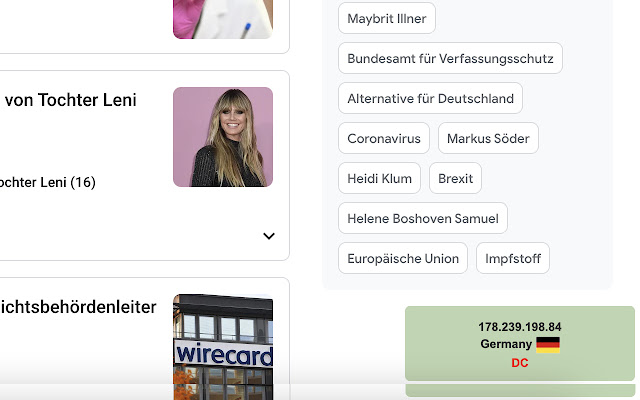
                        The extension conveniently displays the external IP, its country and quality (data center, proxy / vpn service, presence in black lists, etc.).

When the external IP changes,  it is shown a message about that.

The extension allows to control working with websites that are sensitive to IP changes.

Please note that you can configure hotkeys to:
- display the extension settings window
- hide / show information window
- minimize / maximize information window
Grundlæggende oplysninger om udvidelsen
| Navn |  IP Show - Shows external IP, country, quality IP Show - Shows external IP, country, quality |
| ID | ikbpjhjmjhlnfdgfmglfohmcpmngmmkc |
| Officiel URL | https://chrome.google.com/webstore/detail/ip-show-shows-external-ip/ikbpjhjmjhlnfdgfmglfohmcpmngmmkc |
| Beskrivelse | Shows external IP, its quality and country. Real time fixing of the external IP change. |
| Filstørrelse | 360 KB |
| Antal Installationer | 34 |
| Nuværende Version | 3.0.7 |
| Senest Opdateret | 2021-05-26 |
| Udgivelsesdato | 2020-12-23 |
| Bedømmelse | 4.89/5 Samlet 9 Bedømmelser |
| Udvikler | RAWIRA LTD |
| [email protected] | |
| Betalingsmetode | free |
| URL til Fortrolighedspolitik Side | https://rawira.ua/privacy.html |
| Understøttede Sprog | en,ru |
| manifest.json | |
{
    "update_url": "https:\/\/clients2.google.com\/service\/update2\/crx",
    "manifest_version": 2,
    "name": "IP Show - Shows external IP, country, quality",
    "version": "3.0.7",
    "content_scripts": [
        {
            "all_frames": true,
            "js": [
                "Profile.js",
                "index.js",
                "options.js"
            ],
            "match_about_blank": true,
            "matches": [
                "http:\/\/*\/*",
                "https:\/\/*\/*"
            ],
            "run_at": "document_start"
        }
    ],
    "description": "Shows external IP, its quality and country. Real time fixing of the external IP change.",
    "icons": {
        "128": "data\/icons\/128.png",
        "16": "data\/icons\/16.png",
        "32": "data\/icons\/32.png",
        "48": "data\/icons\/48.png",
        "64": "data\/icons\/64.png"
    },
    "permissions": [
        "http:\/\/*\/*",
        "https:\/\/*\/*",
        "tabs",
        "storage",
        "webRequest",
        "webRequestBlocking"
    ],
    "background": {
        "scripts": [
            "Profile.js",
            "bgp.js"
        ],
        "persistent": true
    },
    "browser_action": {
        "default_title": "IP Show - Shows external IP, country, IP quality",
        "default_icon": "data\/icons\/128.png",
        "default_popup": "options.html"
    },
    "short_name": "IPShow",
    "options_ui": {
        "page": "options.html",
        "open_in_tab": true
    },
    "commands": {
        "_execute_browser_action": {
            "description": "__MSG_commandOpenPopup__",
            "suggested_key": {
                "default": "Ctrl+Shift+I",
                "mac": "Command+Shift+I"
            }
        },
        "show_or_hide_badge": {
            "description": "__MSG_commandTogleBadge__",
            "suggested_key": {
                "default": "Ctrl+Shift+O",
                "mac": "Command+Shift+O"
            }
        },
        "minimize_maximize_badge": {
            "description": "__MSG_commandMinMaxBadge__",
            "suggested_key": {
                "default": "Ctrl+Shift+M",
                "mac": "Command+Shift+M"
            }
        }
    },
    "default_locale": "en",
    "web_accessible_resources": [
        "flags\/*.*"
    ]
} | |