HTML Style Quick Viewer
HTML DOM element style quick viewer
Hvad er HTML Style Quick Viewer?
HTML Style Quick Viewer er en Chrome-udvidelse udviklet af _(:з」∠)_, og dens hovedfunktion er "HTML DOM element style quick viewer".
Udvidelsesskærmbilleder
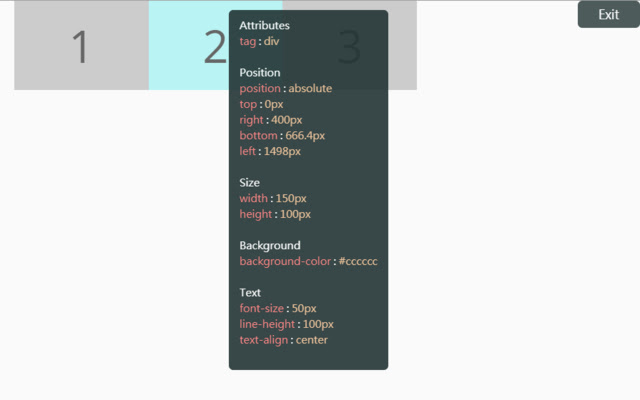
Download HTML Style Quick Viewer-udvidelses-CRX-fil
Download HTML Style Quick Viewer-udvidelsesfiler i crx-format, installer Chrome-udvidelser manuelt i browseren eller del crx-filer med venner for nemt at installere Chrome-udvidelser.
Brugsanvisning til Udvidelsen
                        How about viewing the HTML DOM styles in a different way?
Just move your mouse and it shows the target's styles.

After installation, you may have to reload tabs to for the extension to take effect.

Instructions:
1. Click HTML Style Quick Viewer in the toolbar, then click 'run' button to start.
2. Move mouse to see the element's styles.
3. Mouse left click to close the popup panel.
4. Mouse middle click to pin the popup panel.
5. Click the 'Exit' button at the top-right or click 'Stop' button through the toolbar to stop.
Grundlæggende oplysninger om udvidelsen
| Navn |  HTML Style Quick Viewer HTML Style Quick Viewer |
| ID | inafmkpmbkldliccdbeieeafnbkcmmap |
| Officiel URL | https://chrome.google.com/webstore/detail/html-style-quick-viewer/inafmkpmbkldliccdbeieeafnbkcmmap |
| Beskrivelse | HTML DOM element style quick viewer |
| Filstørrelse | 15.88 KB |
| Antal Installationer | 271 |
| Nuværende Version | 1.0.2 |
| Senest Opdateret | 2018-08-26 |
| Udgivelsesdato | 2018-08-26 |
| Bedømmelse | 5.00/5 Samlet 3 Bedømmelser |
| Udvikler | _(:з」∠)_ |
| [email protected] | |
| Betalingsmetode | free |
| Understøttede Sprog | en |
| manifest.json | |
{
    "update_url": "https:\/\/clients2.google.com\/service\/update2\/crx",
    "name": "HTML Style Quick Viewer",
    "description": "HTML DOM element style quick viewer",
    "version": "1.0.2",
    "permissions": [
        "activeTab"
    ],
    "content_scripts": [
        {
            "matches": [
                "http:\/\/*\/*",
                "https:\/\/*\/*"
            ],
            "js": [
                "content\/content.js"
            ],
            "css": [
                "content\/content.css"
            ],
            "run_at": "document_start"
        }
    ],
    "browser_action": {
        "default_title": "HTML Style Quick Viewer\nRight click (Close)\nMiddle click (Pin)",
        "default_icon": {
            "16": "icons\/icon_16.png",
            "32": "icons\/icon_32.png",
            "48": "icons\/icon_48.png",
            "128": "icons\/icon_128.png"
        },
        "default_popup": "popup\/popup.html"
    },
    "manifest_version": 2
} | |