UCLA Automated Login
Tired of entering your UCLA logon ID and username every single time? Install the UCLA Automated Login! By clicking the icon after…
Hvad er UCLA Automated Login?
UCLA Automated Login er en Chrome-udvidelse udviklet af Stanley Hsu, og dens hovedfunktion er "Tired of entering your UCLA logon ID and username every single time? Install the UCLA Automated Login! By clicking the icon after…".
Udvidelsesskærmbilleder
Download UCLA Automated Login-udvidelses-CRX-fil
Download UCLA Automated Login-udvidelsesfiler i crx-format, installer Chrome-udvidelser manuelt i browseren eller del crx-filer med venner for nemt at installere Chrome-udvidelser.
Brugsanvisning til Udvidelsen
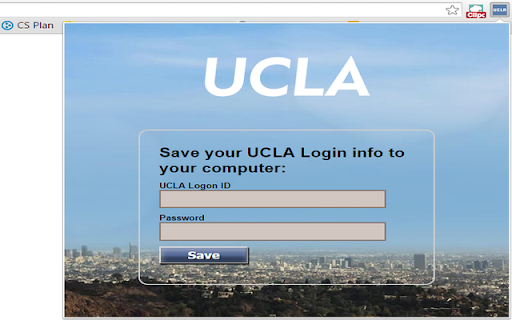
                        Tired of entering your UCLA logon ID and username every single time?
Install the UCLA Automated Login!

By clicking the icon after installing and entering the logon info, you will never have to manually enter them again.

This extension allows you to automatically log in to all the newly updated UCLA authentication pages.
Grundlæggende oplysninger om udvidelsen
| Navn |  UCLA Automated Login UCLA Automated Login |
| ID | inelalkinoinjgbfjfmkfiagmfefpeic |
| Officiel URL | https://chromewebstore.google.com/detail/ucla-automated-login/inelalkinoinjgbfjfmkfiagmfefpeic |
| Beskrivelse | Tired of entering your UCLA logon ID and username every single time? Install the UCLA Automated Login! By clicking the icon after… |
| Filstørrelse | 150 KB |
| Antal Installationer | 13 |
| Nuværende Version | 2.0.1 |
| Senest Opdateret | 2015-11-10 |
| Udgivelsesdato | 2015-11-10 |
| Bedømmelse | 5.00/5 Samlet 3 Bedømmelser |
| Udvikler | Stanley Hsu |
| Betalingsmetode | free |
| Understøttede Sprog | en |
| manifest.json | |
{
    "update_url": "http:\/\/clients2.google.com\/service\/update2\/crx",
    "name": "UCLA Automated Login",
    "version": "2.0.1",
    "manifest_version": 2,
    "icons": {
        "16": "images\/icon16.png",
        "48": "images\/icon48.png",
        "128": "images\/ucla128.png"
    },
    "background": {
        "page": "background.html"
    },
    "permissions": [
        "tabs",
        "https:\/\/*\/*"
    ],
    "options_page": "optionPage.html",
    "browser_action": {
        "default_icon": "images\/icon16.png",
        "default_title": "UCLA Automated Login",
        "default_popup": "options.html"
    }
} | |