Myles
Compare rewards across various affiliate programs
Hvad er Myles?
Myles er en Chrome-udvidelse udviklet af Harsh Gosar, og dens hovedfunktion er "Compare rewards across various affiliate programs".
Udvidelsesskærmbilleder
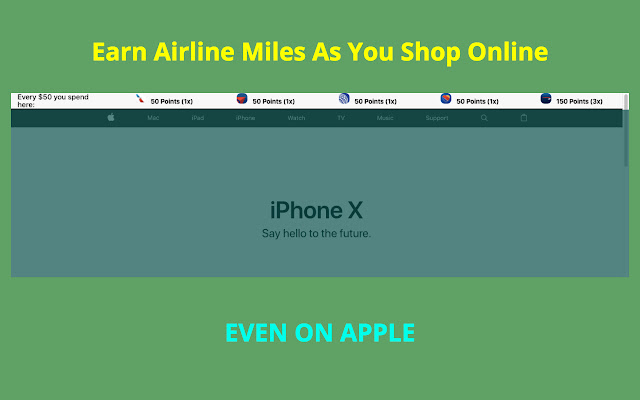

Download Myles-udvidelses-CRX-fil
Download Myles-udvidelsesfiler i crx-format, installer Chrome-udvidelser manuelt i browseren eller del crx-filer med venner for nemt at installere Chrome-udvidelser.
Brugsanvisning til Udvidelsen
                        Compare your rewards earnings for Ebates, American Airlines, Delta Airlines, United Ailrines, Southwest Airlines shopping portal

[Points updated for Feb 2018]

Disclaimer:
1) This chrome extension is not perfect and I don't guarantee the accuracy of the points depicted.
2) I am not liable for any of your shopping decisions and points received.
3) The airline decides their own policy and it's up to you to read that.
4) Points may not be exact and you agree to confirm them yourself.

You agree to these terms by downloading the extension.

Email your suggestions to [email protected] .
Grundlæggende oplysninger om udvidelsen
| Navn |  Myles Myles |
| ID | knjgohecfkkdfmhknimolilgfcgmephf |
| Officiel URL | https://chrome.google.com/webstore/detail/myles/knjgohecfkkdfmhknimolilgfcgmephf |
| Beskrivelse | Compare rewards across various affiliate programs |
| Filstørrelse | 1.01 MB |
| Antal Installationer | 51 |
| Nuværende Version | 1.0.5 |
| Senest Opdateret | 2018-02-27 |
| Udgivelsesdato | 2018-02-27 |
| Bedømmelse | 5.00/5 Samlet 6 Bedømmelser |
| Udvikler | Harsh Gosar |
| [email protected] | |
| Betalingsmetode | free |
| Udvidelseswebsted | http://thatmilesapp.com |
| URL til Fortrolighedspolitik Side | http://gosar.us/privacy.html |
| Understøttede Sprog | en-US |
| manifest.json | |
{
    "update_url": "https:\/\/clients2.google.com\/service\/update2\/crx",
    "manifest_version": 2,
    "name": "Myles",
    "description": "Compare rewards across various affiliate programs",
    "version": "1.0.5",
    "icons": {
        "16": "icons\/16.png",
        "48": "icons\/64.png",
        "128": "icons\/128.png"
    },
    "background": {
        "persistent": false,
        "scripts": [
            "background\/location.js",
            "background\/main.js"
        ]
    },
    "browser_action": {
        "default_popup": "popup\/popup.html"
    },
    "permissions": [
        "activeTab",
        "identity",
        "tabs",
        "geolocation",
        "storage"
    ],
    "content_scripts": [
        {
            "matches": [
                "http:\/\/www.amazon.com\/",
                "https:\/\/www.amazon.com\/"
            ],
            "css": [
                "lib\/font.css",
                "content\/amazon-home\/style.css"
            ],
            "js": [
                "lib\/jquery.js",
                "lib\/tether.js",
                "lib\/bootstrap.min.js",
                "content\/amazon-home\/script.js"
            ]
        },
        {
            "matches": [
                "http:\/\/*\/*",
                "https:\/\/*\/*"
            ],
            "exclude_globs": [
                "http:\/\/www.amazon.com\/*",
                "https:\/\/www.amazon.com\/*"
            ],
            "css": [
                "lib\/font.css",
                "header\/style.css"
            ],
            "js": [
                "lib\/jquery.js",
                "lib\/tether.js",
                "lib\/bootstrap.min.js",
                "content\/db\/db_us.js",
                "content\/db\/db_in.js",
                "content\/helper\/domain_extract.js",
                "content\/header\/header_us.js",
                "content\/header\/header_in.js",
                "content\/script.js"
            ]
        },
        {
            "matches": [
                "https:\/\/shop.jetprivilege.com\/",
                "http:\/\/shop.jetprivilege.com\/"
            ],
            "css": [],
            "js": [
                "lib\/jquery.js",
                "content\/jet\/script.js"
            ]
        }
    ],
    "content_security_policy": "script-src 'self' https:\/\/ssl.google-analytics.com; object-src 'self'"
} | |