Journal access through HKU library
A simple chrome extension that let you access journal through HKU library resources (HKU ID needed).
Hvad er Journal access through HKU library?
Journal access through HKU library er en Chrome-udvidelse udviklet af junyichen, og dens hovedfunktion er "A simple chrome extension that let you access journal through HKU library resources (HKU ID needed).".
Udvidelsesskærmbilleder


Download Journal access through HKU library-udvidelses-CRX-fil
Download Journal access through HKU library-udvidelsesfiler i crx-format, installer Chrome-udvidelser manuelt i browseren eller del crx-filer med venner for nemt at installere Chrome-udvidelser.
Brugsanvisning til Udvidelsen
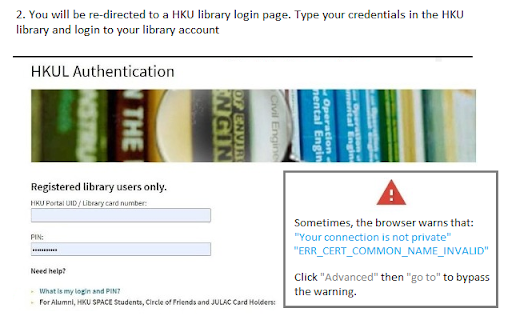
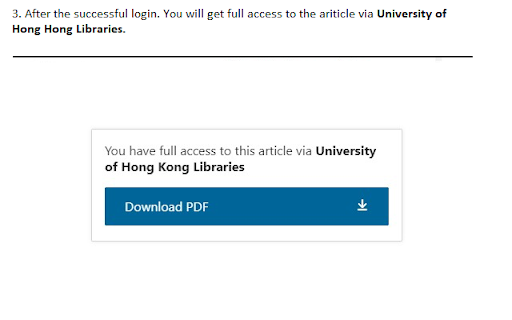
An extension that redirect you from the journal page to the HKU library portal. You need to login the HKU library. The extension will automatically parse the current URL of the current paper page to the HKU library address. Grundlæggende oplysninger om udvidelsen
| Navn |  Journal access through HKU library Journal access through HKU library |
| ID | lcnnijjgcjfpcfjgnahbcpapbmkiceld |
| Officiel URL | https://chromewebstore.google.com/detail/journal-access-through-hk/lcnnijjgcjfpcfjgnahbcpapbmkiceld |
| Beskrivelse | A simple chrome extension that let you access journal through HKU library resources (HKU ID needed). |
| Filstørrelse | 47.64 KB |
| Antal Installationer | 135 |
| Nuværende Version | 0.0.1 |
| Senest Opdateret | 2021-09-02 |
| Udgivelsesdato | 2021-08-04 |
| Udvikler | junyichen |
| [email protected] | |
| Betalingsmetode | free |
| Understøttede Sprog | en-US |
| manifest.json | |
{
    "update_url": "https:\/\/clients2.google.com\/service\/update2\/crx",
    "manifest_version": 2,
    "name": "Journal access through HKU library",
    "short_name": "HKULibJ",
    "description": "A simple chrome extension that let you access journal through HKU library resources (HKU ID needed).",
    "version": "0.0.1",
    "minimum_chrome_version": "38",
    "permissions": [
        "contextMenus",
        "tabs"
    ],
    "icons": {
        "16": "assets\/icon16.png",
        "128": "assets\/icon128.png"
    },
    "background": {
        "page": "background.html"
    }
} | |