Continue Without Supporting
Browser extension that auto-clicks on "continue without supporting"/similar phrases when given a popup about disabling ad blocking.
Hvad er Continue Without Supporting?
Continue Without Supporting er en Chrome-udvidelse udviklet af Ryan Stewart, og dens hovedfunktion er "Browser extension that auto-clicks on "continue without supporting"/similar phrases when given a popup about disabling ad blocking.".
Udvidelsesskærmbilleder
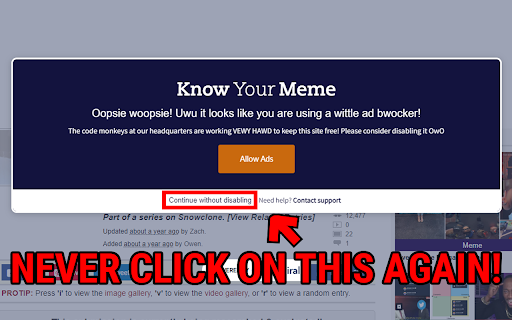
Download Continue Without Supporting-udvidelses-CRX-fil
Download Continue Without Supporting-udvidelsesfiler i crx-format, installer Chrome-udvidelser manuelt i browseren eller del crx-filer med venner for nemt at installere Chrome-udvidelser.
Brugsanvisning til Udvidelsen
A browser extension that auto-clicks on "continue without supporting" or similar phrases when given a popup about disabling ad blocking. You can now spend less time trying to find the small continue text and more time actually using the website! Grundlæggende oplysninger om udvidelsen
| Navn |  Continue Without Supporting Continue Without Supporting |
| ID | lieiooigeiockdceiekbikfaklnklmef |
| Officiel URL | https://chromewebstore.google.com/detail/continue-without-supporti/lieiooigeiockdceiekbikfaklnklmef |
| Beskrivelse | Browser extension that auto-clicks on "continue without supporting"/similar phrases when given a popup about disabling ad blocking. |
| Filstørrelse | 46.19 KB |
| Antal Installationer | 81 |
| Nuværende Version | 1.0.0 |
| Senest Opdateret | 2023-06-10 |
| Udgivelsesdato | 2023-06-10 |
| Bedømmelse | 5.00/5 Samlet 1 Bedømmelser |
| Udvikler | Ryan Stewart |
| [email protected] | |
| Betalingsmetode | free |
| Udvidelseswebsted | https://github.com/rynstwrt/Continue-Without-Supporting |
| Understøttede Sprog | en-US |
| manifest.json | |
{
"update_url": "https:\/\/clients2.google.com\/service\/update2\/crx",
"manifest_version": 3,
"name": "Continue Without Supporting",
"version": "1.0.0",
"description": "Browser extension that auto-clicks on \"continue without supporting\"\/similar phrases when given a popup about disabling ad blocking.",
"content_scripts": [
{
"js": [
"scripts\/content.js"
],
"matches": [
"http:\/\/*\/*",
"https:\/\/*\/*"
]
}
],
"icons": {
"16": "assets\/16.png",
"48": "assets\/48.png",
"128": "assets\/128.png"
},
"host_permissions": [
" | |