Magazine Manager & Newspaper Manager
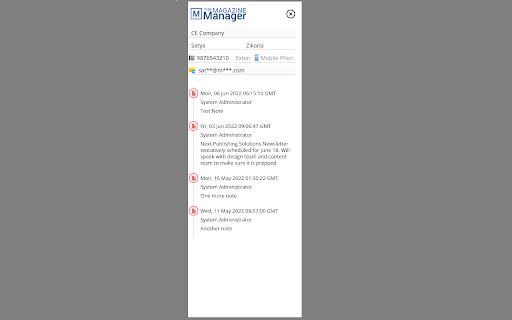
Manage the notes of Magazine/Newspaper Manager CRM emails through Gmail or Outlook/Microsoft 365 email services.
Hvad er Magazine Manager & Newspaper Manager?
Magazine Manager & Newspaper Manager er en Chrome-udvidelse udviklet af Mirabel Technologies Inc., og dens hovedfunktion er "Manage the notes of Magazine/Newspaper Manager CRM emails through Gmail or Outlook/Microsoft 365 email services.".
Udvidelsesskærmbilleder

Download Magazine Manager & Newspaper Manager-udvidelses-CRX-fil
Download Magazine Manager & Newspaper Manager-udvidelsesfiler i crx-format, installer Chrome-udvidelser manuelt i browseren eller del crx-filer med venner for nemt at installere Chrome-udvidelser.
Brugsanvisning til Udvidelsen
                        Connect the Magazine/Newspaper Manager CRM with a Gmail or Outlook/Microsoft 365 email account to allow users to see Contact details and CRM notes within the email inbox and copy emails and their attachments directly into the CRM.

Magazine/Newspaper Manager is the global leader in magazine publishing software solutions, serving over 18,000+ publications worldwide. It was the first web-based CRM built for publishers. In a unified platform, the Magazine Manager includes a sales CRM, centralized ad order entry system, production, billing, digital pagination and editions, marketing automation, circulation, audience development, a full subscription suite, an email verification system, and more.
Grundlæggende oplysninger om udvidelsen
| Navn |  Magazine Manager & Newspaper Manager Magazine Manager & Newspaper Manager |
| ID | lpbnaffkibfbolkopnfancfnocoojnbh |
| Officiel URL | https://chromewebstore.google.com/detail/magazine-manager-newspape/lpbnaffkibfbolkopnfancfnocoojnbh |
| Beskrivelse | Manage the notes of Magazine/Newspaper Manager CRM emails through Gmail or Outlook/Microsoft 365 email services. |
| Filstørrelse | 168 KB |
| Antal Installationer | 290 |
| Nuværende Version | 1.8 |
| Senest Opdateret | 2023-12-09 |
| Udgivelsesdato | 2022-09-20 |
| Bedømmelse | 5.00/5 Samlet 1 Bedømmelser |
| Udvikler | Mirabel Technologies Inc. |
| [email protected] | |
| Betalingsmetode | free |
| Udvidelseswebsted | https://www.magazinemanager.com |
| Hjælpeside-URL | https://www.magazinemanager.com/contact/ |
| URL til Fortrolighedspolitik Side | https://www.mirabeltechnologies.com/mirabel/privacy-statement |
| Understøttede Sprog | en-US |
| manifest.json | |
{
    "update_url": "https:\/\/clients2.google.com\/service\/update2\/crx",
    "name": "Magazine Manager & Newspaper Manager",
    "description": "Manage the notes of Magazine\/Newspaper Manager CRM emails through Gmail or Outlook\/Microsoft 365 email services.",
    "version": "1.8",
    "manifest_version": 3,
    "icons": {
        "16": "gmail\/images\/mm-icon.png",
        "48": "gmail\/images\/mm-icon.png",
        "128": "gmail\/images\/mm-icon.png"
    },
    "background": {
        "service_worker": "background\/outlook.js"
    },
    "host_permissions": [
        "https:\/\/outlook.live.com\/*",
        "https:\/\/outlook.office.com\/*",
        "https:\/\/outlook.office365.com\/*"
    ],
    "content_scripts": [
        {
            "js": [
                "gmail\/index.js"
            ],
            "matches": [
                "https:\/\/mail.google.com\/*"
            ],
            "css": [
                "gmail\/index.dde74c86.css"
            ]
        },
        {
            "js": [
                "outlook\/index.js"
            ],
            "matches": [
                "https:\/\/outlook.live.com\/*",
                "https:\/\/outlook.office.com\/*",
                "https:\/\/outlook.office365.com\/*"
            ],
            "css": [
                "outlook\/index.99f95f54.css"
            ]
        }
    ],
    "web_accessible_resources": [
        {
            "resources": [
                "gmail\/images\/*",
                "gmail\/scripts\/*"
            ],
            "matches": [
                "https:\/\/mail.google.com\/*"
            ]
        },
        {
            "resources": [
                "outlook\/images\/*"
            ],
            "matches": [
                "https:\/\/outlook.live.com\/*",
                "https:\/\/outlook.office.com\/*",
                "https:\/\/outlook.office365.com\/*"
            ]
        }
    ],
    "permissions": [
        "storage",
        "webRequest",
        "tabs",
        "activeTab"
    ]
} | |


