PDF Bookmark
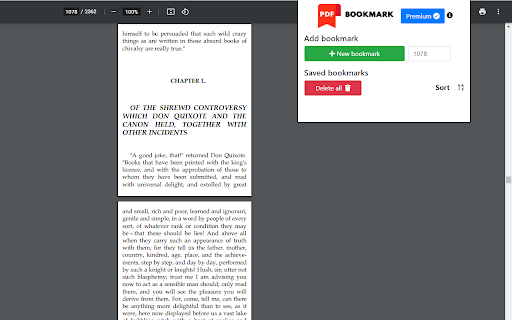
The easiest way to have all your PDF file organized! Do you want to have all your books in one place with a bookmark in a specific…
Hvad er PDF Bookmark?
PDF Bookmark er en Chrome-udvidelse udviklet af overstudiotech, og dens hovedfunktion er "The easiest way to have all your PDF file organized! Do you want to have all your books in one place with a bookmark in a specific…".
Udvidelsesskærmbilleder

Download PDF Bookmark-udvidelses-CRX-fil
Download PDF Bookmark-udvidelsesfiler i crx-format, installer Chrome-udvidelser manuelt i browseren eller del crx-filer med venner for nemt at installere Chrome-udvidelser.
Brugsanvisning til Udvidelsen
                        The easiest way to have all your PDF file organized!

Do you want to have all your books in one place with a bookmark in a specific page?
Are you working on a project with multiple PDF files?

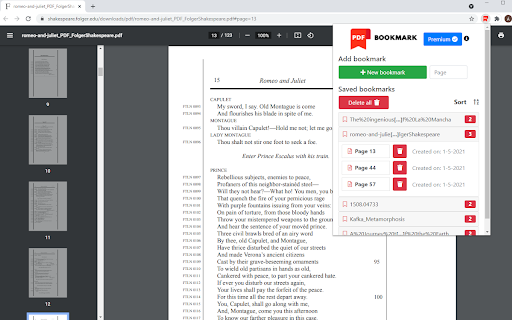
With PDF Bookmark you will be able to:
•    CREATE bookmarks of PDFs on websites or your PC
•    SAVE UNLIMITED pages per book
•    SAVE UNLIMITED PDF files
•    SORT your books alphabetically

Contact us:
- Email: [email protected]
- Website: pdfbookmark.github.io
Grundlæggende oplysninger om udvidelsen
| Navn |  PDF Bookmark PDF Bookmark |
| ID | mcalpfgelkfeonobdckkjgkgmcmjamgb |
| Officiel URL | https://chromewebstore.google.com/detail/pdf-bookmark/mcalpfgelkfeonobdckkjgkgmcmjamgb |
| Beskrivelse | The easiest way to have all your PDF file organized! Do you want to have all your books in one place with a bookmark in a specific… |
| Filstørrelse | 417 KB |
| Antal Installationer | 3,123 |
| Nuværende Version | 0.2 |
| Senest Opdateret | 2021-05-30 |
| Udgivelsesdato | 2021-05-17 |
| Bedømmelse | 4.50/5 Samlet 8 Bedømmelser |
| Udvikler | overstudiotech |
| [email protected] | |
| Betalingsmetode | in_app |
| Udvidelseswebsted | https://pdfbookmark.github.io |
| URL til Fortrolighedspolitik Side | https://pdfbookmark.github.io/privacy_policy.html |
| Understøttede Sprog | en |
| manifest.json | |
{
"update_url": "https:\/\/clients2.google.com\/service\/update2\/crx",
"name": "PDF Bookmark",
"version": "0.2",
"manifest_version": 2,
"background": {
"scripts": [
"ExtPay.js",
"background.js"
]
},
"content_scripts": [
{
"matches": [
"https:\/\/extensionpay.com\/*"
],
"js": [
"ExtPay.js"
],
"run_at": "document_start"
},
{
"matches": [
" | |