xPath 2 & Robot framework commands
Click on any element to get the xPath
Hvad er xPath 2 & Robot framework commands?
xPath 2 & Robot framework commands er en Chrome-udvidelse udviklet af cuong-vm, og dens hovedfunktion er "Click on any element to get the xPath".
Udvidelsesskærmbilleder


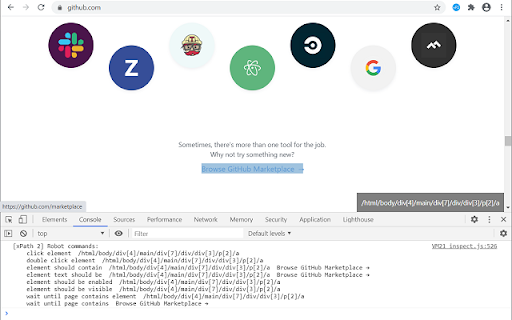
Download xPath 2 & Robot framework commands-udvidelses-CRX-fil
Download xPath 2 & Robot framework commands-udvidelsesfiler i crx-format, installer Chrome-udvidelser manuelt i browseren eller del crx-filer med venner for nemt at installere Chrome-udvidelser.
Brugsanvisning til Udvidelsen
                        This xPath 2 plugin is forked from Tomasz Rembacz's xPath Finder plugin with some path enhancement and Robot framework commands generator support.

Click on any element to get the xPath
Plugin to get the elements xPath.

Usage:
1. Click on the plugin icon, cursor will be changed to the crosshair
2. Hover over the desired element (elements are highlighted on hover)
3. Click on the element and his xPath will display in the panel at the bottom of the page

Options:
- turn on/off inspector,
- turn on/off auto copy to clipboard,
- choose between short ID's or normal path,
- choose Robot framework commands generator,
- change xpath box position

History
1) 22-July-2020: Publish new version (1.0.4) for XPath enhancement and bug fixes
Grundlæggende oplysninger om udvidelsen
| Navn | |
| ID | mniogbfahfjmogpmelllbadjdhgilemm |
| Officiel URL | https://chromewebstore.google.com/detail/xpath-2-robot-framework-c/mniogbfahfjmogpmelllbadjdhgilemm |
| Beskrivelse | Click on any element to get the xPath |
| Filstørrelse | 18.62 KB |
| Antal Installationer | 320 |
| Nuværende Version | 1.0.4 |
| Senest Opdateret | 2020-07-23 |
| Udgivelsesdato | 2020-07-16 |
| Udvikler | cuong-vm |
| [email protected] | |
| Betalingsmetode | free |
| Udvidelseswebsted | https://github.com/cuong-vm/xpath-finder |
| Hjælpeside-URL | https://github.com/cuong-vm/xpath-finder |
| Understøttede Sprog | en |
| manifest.json | |
{
"update_url": "https:\/\/clients2.google.com\/service\/update2\/crx",
"manifest_version": 2,
"name": "xPath 2 & Robot framework commands",
"description": "Click on any element to get the xPath",
"homepage_url": "https:\/\/github.com\/cuong-vm\/xpath-finder",
"version": "1.0.4",
"icons": {
"64": "icons\/default-64.png"
},
"background": {
"scripts": [
"background.js"
]
},
"browser_action": {
"default_icon": "icons\/default-64.png",
"default_title": "Click on any element to get the XPath and Robot framework automated test commands"
},
"content_scripts": [
{
"all_frames": true,
"matches": [
" | |