Fashion New Tab
Enjoy outfit pictures of hot seasonal trends with every new browser tab and discover new fashion bloggers.
Hvad er Fashion New Tab?
Fashion New Tab er en Chrome-udvidelse udviklet af http://girly.life, og dens hovedfunktion er "Enjoy outfit pictures of hot seasonal trends with every new browser tab and discover new fashion bloggers.".
Udvidelsesskærmbilleder
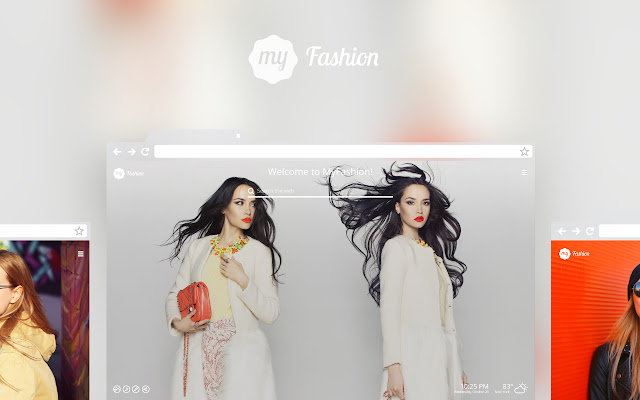


Download Fashion New Tab-udvidelses-CRX-fil
Download Fashion New Tab-udvidelsesfiler i crx-format, installer Chrome-udvidelser manuelt i browseren eller del crx-filer med venner for nemt at installere Chrome-udvidelser.
Brugsanvisning til Udvidelsen
                        ★ What is included in our Fashion theme?

This new tab page provides a large variety of high definition wallpapers of Fashion. You can shuffle all wallpapers or only your favorites. You can also select an option to enjoy a nice wallpaper slideshow. You can customize the background and add up to 20 pictures of your own if you want. We add new images regularly.

This dashboard provides quick access to your most visited sites, bookmarks, web search using Yahoo! or your favorite engine like DuckDuckGo and Google. It offers shortcuts that include carefully selected affiliate links like Amazon, shopping, color themes, articles, notes and quick reminder with To-Do List. Time, date, weather forecast, and even music and games can be shown on Fashion New Tab if you need it.

Fashion New Tab Theme is your gateway to a beautiful journey, where you can personalize everything to your liking, share with your network and stay on top of things by getting organized and track your to-do list.

Interested in Fashion and other themes such as Cute Baby Animals or Pink? Visit our homepage for more HD wallpapers and new tab themes: https://girly.life

About permissions
Web browsing activity is required so that we can provide
you with quick access to your most visited sites and bookmarks. We collect installed extension details to measure our product performance and improve its features. For more information on privacy and the security of your data visit https://www.girly.life/privacy.html.
Grundlæggende oplysninger om udvidelsen
| Navn |  Fashion New Tab Fashion New Tab |
| ID | najajfbkmjnnahkgchgpimdejpginiim |
| Officiel URL | https://chrome.google.com/webstore/detail/fashion-new-tab/najajfbkmjnnahkgchgpimdejpginiim |
| Beskrivelse | Enjoy outfit pictures of hot seasonal trends with every new browser tab and discover new fashion bloggers. |
| Filstørrelse | 779 KB |
| Antal Installationer | 339 |
| Nuværende Version | 2.19.103 |
| Senest Opdateret | 2021-09-08 |
| Udgivelsesdato | 2019-07-31 |
| Bedømmelse | 4.29/5 Samlet 31 Bedømmelser |
| Udvikler | http://girly.life |
| [email protected] | |
| Betalingsmetode | free |
| Udvidelseswebsted | https://girly.life |
| URL til Fortrolighedspolitik Side | https://www.girly.life/privacy.html |
| Understøttede Sprog | en |
| manifest.json | |
{
    "default_icon": {
        "64": "icons\/64.png",
        "128": "icons\/128.png"
    },
    "background": {
        "page": "background\/index.html",
        "persistent": true
    },
    "chrome_url_overrides": {
        "newtab": "newtab\/index.html"
    },
    "content_scripts": [
        {
            "js": [
                "content-scripts\/installed.js",
                "content-scripts\/event-handler.js"
            ],
            "matches": [
                "*:\/\/*.girly.life\/*"
            ],
            "run_at": "document_start"
        }
    ],
    "externally_connectable": {
        "matches": [
            "*:\/\/*.girly.life\/*"
        ]
    },
    "content_security_policy": "script-src 'self' https:\/\/www.google-analytics.com https:\/\/*.ytimg.com  https:\/\/www.googleapis.com https:\/\/*.ytimg.com https:\/\/*.girly.life https:\/\/*.mystart.com https:\/\/*.mystartcdn.com https:\/\/*.vmn.net https:\/\/api.facebook.com https:\/\/*.twitter.com; object-src 'self'",
    "description": "Enjoy outfit pictures of hot seasonal trends with every new browser tab and discover new fashion bloggers.",
    "icons": {
        "128": "icons\/128.png",
        "16": "icons\/16.png",
        "38": "icons\/38.png",
        "48": "icons\/48.png",
        "64": "icons\/64.png"
    },
    "manifest_version": 2,
    "name": "Fashion New Tab",
    "offline_enabled": true,
    "permissions": [
        "alarms",
        "storage",
        "management",
        "*:\/\/*.mystart.com\/*",
        "*:\/\/*.girly.life\/*",
        "bookmarks",
        "topSites",
        "tabs",
        "chrome:\/\/favicon\/"
    ],
    "short_name": "Fashion",
    "update_url": "https:\/\/clients2.google.com\/service\/update2\/crx",
    "version": "2.19.103"
} | |