Desmos Text I/O
import/export Desmos graphs as text (json).
Hvad er Desmos Text I/O?
Desmos Text I/O er en Chrome-udvidelse udviklet af hyrodium, og dens hovedfunktion er "import/export Desmos graphs as text (json).".
Udvidelsesskærmbilleder
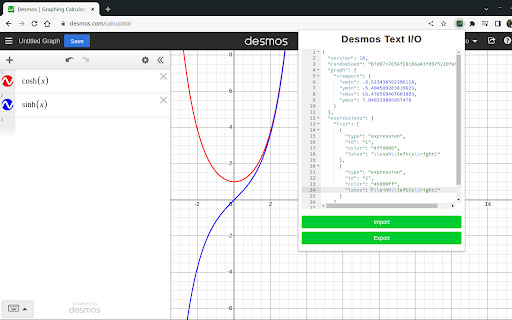
Download Desmos Text I/O-udvidelses-CRX-fil
Download Desmos Text I/O-udvidelsesfiler i crx-format, installer Chrome-udvidelser manuelt i browseren eller del crx-filer med venner for nemt at installere Chrome-udvidelser.
Brugsanvisning til Udvidelsen
                        This extension enables the import/export of desmos graphs in JSON format. With this feature, you will have the following benefits:

- Customize your graphs (more colors, high-resolution images)
- Save your graphs locally as text files.
- Create desmos graphs in JSON format from other software.
Grundlæggende oplysninger om udvidelsen
| Navn |  Desmos Text I/O Desmos Text I/O |
| ID | ndjdcebpigpfidnilppdpcdkibidfmaa |
| Officiel URL | https://chromewebstore.google.com/detail/desmos-text-io/ndjdcebpigpfidnilppdpcdkibidfmaa |
| Beskrivelse | import/export Desmos graphs as text (json). |
| Filstørrelse | 126 KB |
| Antal Installationer | 299 |
| Nuværende Version | 1.2.0 |
| Senest Opdateret | 2023-03-24 |
| Udgivelsesdato | 2022-08-09 |
| Bedømmelse | 5.00/5 Samlet 1 Bedømmelser |
| Udvikler | hyrodium |
| [email protected] | |
| Betalingsmetode | free |
| Udvidelseswebsted | https://github.com/hyrodium/DesmosTextIO |
| Understøttede Sprog | en-US |
| manifest.json | |
{
    "update_url": "https:\/\/clients2.google.com\/service\/update2\/crx",
    "name": "Desmos Text I\/O",
    "description": "import\/export Desmos graphs as text (json).",
    "version": "1.2.0",
    "manifest_version": 3,
    "action": {
        "default_popup": "popup.html"
    },
    "icons": {
        "16": "icons\/icon16.png",
        "32": "icons\/icon32.png",
        "48": "icons\/icon48.png",
        "64": "icons\/icon64.png",
        "128": "icons\/icon128.png"
    },
    "browser_specific_settings": {
        "gecko": {
            "id": "{2904c92e-079c-424b-bcd4-e1d4ae624249}"
        }
    },
    "content_scripts": [
        {
            "js": [
                "content.bundle.js"
            ],
            "matches": [
                "https:\/\/www.desmos.com\/*"
            ]
        }
    ],
    "web_accessible_resources": [
        {
            "resources": [
                "injected.js"
            ],
            "matches": [
                "https:\/\/*\/*"
            ]
        }
    ]
} | |