Mobile Locker for Gmail
Share links to Mobile Locker files in Gmail.
Hvad er Mobile Locker for Gmail?
Mobile Locker for Gmail er en Chrome-udvidelse udviklet af https://mobilelocker.com, og dens hovedfunktion er "Share links to Mobile Locker files in Gmail.".
Udvidelsesskærmbilleder
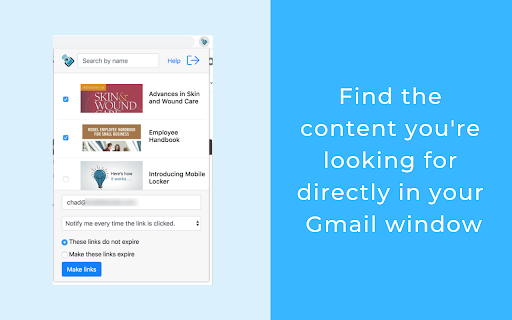


Download Mobile Locker for Gmail-udvidelses-CRX-fil
Download Mobile Locker for Gmail-udvidelsesfiler i crx-format, installer Chrome-udvidelser manuelt i browseren eller del crx-filer med venner for nemt at installere Chrome-udvidelser.
Brugsanvisning til Udvidelsen
                        Mobile Locker for Gmail allows you to:

* Access the content you need directly through Gmail
* Improve conversations by easily inserting sharable links
* Engage buyers by presenting like a pro
* Optimize your collateral with your existing tools
* Send collateral, videos, quotes, and more - without having to worry about attachment size limits
* Track engagement - you'll be alerted when they engage with the content so you can follow up

Requirements:
* A Mobile Locker account
* A Gmail account
Grundlæggende oplysninger om udvidelsen
| Navn |  Mobile Locker for Gmail Mobile Locker for Gmail |
| ID | ojehkongkhliekkfkickfgflgefcokgk |
| Officiel URL | https://chromewebstore.google.com/detail/mobile-locker-for-gmail/ojehkongkhliekkfkickfgflgefcokgk |
| Beskrivelse | Share links to Mobile Locker files in Gmail. |
| Filstørrelse | 11.1 MB |
| Antal Installationer | 42 |
| Nuværende Version | 3.0.1 |
| Senest Opdateret | 2024-01-26 |
| Udgivelsesdato | 2020-05-12 |
| Bedømmelse | 5.00/5 Samlet 1 Bedømmelser |
| Udvikler | https://mobilelocker.com |
| [email protected] | |
| Betalingsmetode | free |
| Udvidelseswebsted | https://www.mobilelocker.com/gmail |
| Hjælpeside-URL | https://docs.mobilelocker.com/docs/install-and-use-mobile-locker-for-gmail |
| URL til Fortrolighedspolitik Side | https://www.mobilelocker.com/privacy |
| Understøttede Sprog | en-US |
| manifest.json | |
{
    "update_url": "https:\/\/clients2.google.com\/service\/update2\/crx",
    "manifest_version": 3,
    "name": "Mobile Locker for Gmail",
    "short_name": "Mobile Locker",
    "version": "3.0.1",
    "description": "Share links to Mobile Locker files in Gmail.",
    "homepage_url": "https:\/\/www.mobilelocker.com",
    "author": "[email protected]",
    "icons": {
        "16": "images\/mobilelocker_icon_16.png",
        "32": "images\/mobilelocker_icon_32.png",
        "48": "images\/mobilelocker_icon_48.png",
        "128": "images\/mobilelocker_icon_128.png"
    },
    "action": {
        "default_popup": "index.html",
        "default_icon": {
            "16": "images\/mobilelocker_icon_16.png",
            "32": "images\/mobilelocker_icon_32.png",
            "48": "images\/mobilelocker_icon_48.png",
            "128": "images\/mobilelocker_icon_128.png"
        }
    },
    "background": {
        "service_worker": "background.js"
    },
    "content_scripts": [
        {
            "matches": [
                "https:\/\/mail.google.com\/*"
            ],
            "js": [
                "mobilelocker.js"
            ],
            "run_at": "document_end"
        }
    ],
    "incognito": "not_allowed",
    "offline_enabled": false,
    "permissions": [
        "declarativeContent",
        "scripting",
        "storage"
    ],
    "host_permissions": [
        "https:\/\/assets.mobilelocker.com\/*",
        "https:\/\/mail.google.com\/*"
    ],
    "web_accessible_resources": [
        {
            "resources": [
                "fonts\/vendor\/@fortawesome\/fontawesome-pro\/*",
                "images\/*"
            ],
            "matches": [
                "https:\/\/mail.google.com\/*"
            ]
        }
    ]
} | |