Next DevTools
Quickly check the props of a NextJS website, inspect all props on hover. Add a badge icon to indicate when the page props for a…
Was ist Next DevTools?
Next DevTools ist eine Chrome-Erweiterung, die von CraftValue entwickelt wurde, und ihr Hauptmerkmal ist "Quickly check the props of a NextJS website, inspect all props on hover. Add a badge icon to indicate when the page props for a…".
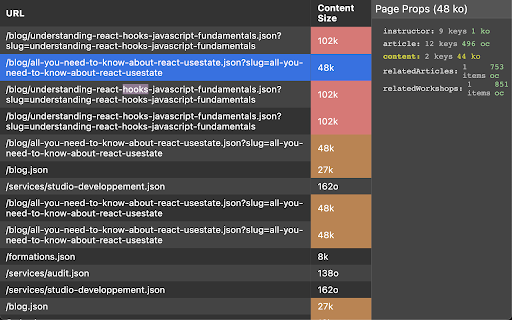
Erweiterungsscreenshots
Next DevTools-Erweiterungs-CRX-Datei herunterladen
Laden Sie Next DevTools-Erweiterungsdateien im crx-Format herunter, installieren Sie Chrome-Erweiterungen manuell im Browser oder teilen Sie die crx-Dateien mit Freunden, um Chrome-Erweiterungen einfach zu installieren.
Anleitung zur Verwendung der Erweiterung
                        Quickly check the props of a NextJS website, inspect all props on hover.

Add a badge icon to indicate when the page props for a given page are too heavy in NextJS.
It will only works for first page load.

When using the `Link` component you may consider have a look at the "NextJS DevTools" panel that this extension is adding in the DevTools.

Icons are from the CoreUI Icons set (see https://github.com/coreui/coreui-icons?ref=iconduck.com).
Grundlegende Informationen zur Erweiterung
| Name |  Next DevTools Next DevTools |
| ID | admidbamafmdejfidoeijgghcffngbmp |
| Offizielle URL | https://chromewebstore.google.com/detail/next-devtools/admidbamafmdejfidoeijgghcffngbmp |
| Beschreibung | Quickly check the props of a NextJS website, inspect all props on hover. Add a badge icon to indicate when the page props for a… |
| Dateigröße | 67.98 KB |
| Installationsanzahl | 2,693 |
| Aktuelle Version | 1.1.1 |
| Letztes Update | 2024-02-20 |
| Veröffentlichungsdatum | 2022-11-14 |
| Bewertung | 2.00/5 Insgesamt 4 Bewertungen |
| Entwickler | CraftValue |
| [email protected] | |
| Zahlungsart | free |
| Erweiterungswebsite | https://github.com/gpichot/chrome-extension-next-devtools |
| Hilfeseite URL | https://github.com/gpichot/chrome-extension-next-devtools/issues |
| Unterstützte Sprachen | en-US |
| manifest.json | |
{
"update_url": "https:\/\/clients2.google.com\/service\/update2\/crx",
"manifest_version": 3,
"minimum_chrome_version": "88.0",
"devtools_page": "src\/next-devtools.html",
"action": {
"default_icon": {
"16": "public\/icon.png",
"32": "public\/icon.png",
"48": "public\/icon.png",
"128": "public\/icon.png"
},
"default_popup": "src\/popup.html"
},
"background": {
"service_worker": "service-worker-loader.js",
"type": "module"
},
"permissions": [
"tabs",
"scripting"
],
"host_permissions": [
"https:\/\/*\/*",
"http:\/\/*\/*"
],
"web_accessible_resources": [
{
"matches": [
" | |