Add to Bookmax
Add Bookmarks to your Bookmax Account.
Was ist Add to Bookmax?
Add to Bookmax ist eine Chrome-Erweiterung, die von http://my.bookmax.net entwickelt wurde, und ihr Hauptmerkmal ist "Add Bookmarks to your Bookmax Account.".
Erweiterungsscreenshots
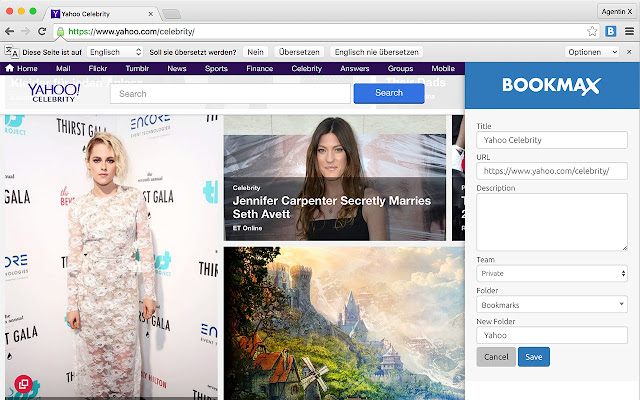

Add to Bookmax-Erweiterungs-CRX-Datei herunterladen
Laden Sie Add to Bookmax-Erweiterungsdateien im crx-Format herunter, installieren Sie Chrome-Erweiterungen manuell im Browser oder teilen Sie die crx-Dateien mit Freunden, um Chrome-Erweiterungen einfach zu installieren.
Anleitung zur Verwendung der Erweiterung
                        Add Bookmarks to your Bookmax Account.

Bookmax.net is an online bookmark manager to store bookmarks, lists, contacts, memos, notes and more online.

Share all your bookmarks and data in teams!

Features:
Hierarchical Folders
Easy drag and drop handling
Search function for all your entries
Search bookmarks
Favorites
3 kind of bookmarks views with thumbshots or favicons

There is also an App for your Bookmax bookmark list, right here on the Chrome App Store.

Datenschutzerklärung: https://www.bookmax.net/datenschutzerklaerung
Privacy Policy: https://www.bookmax.net/privacy-policy
Grundlegende Informationen zur Erweiterung
| Name |  Add to Bookmax Add to Bookmax |
| ID | aebecfmhkadmehbpadebjabkhidmcdcm |
| Offizielle URL | https://chrome.google.com/webstore/detail/add-to-bookmax/aebecfmhkadmehbpadebjabkhidmcdcm |
| Beschreibung | Add Bookmarks to your Bookmax Account. |
| Dateigröße | 777 KB |
| Installationsanzahl | 922 |
| Aktuelle Version | 3.2 |
| Letztes Update | 2020-02-29 |
| Veröffentlichungsdatum | 2020-02-29 |
| Bewertung | 4.76/5 Insgesamt 17 Bewertungen |
| Entwickler | http://my.bookmax.net |
| [email protected] | |
| Zahlungsart | free |
| Erweiterungswebsite | http://www.bookmax.net |
| URL der Datenschutzrichtlinien-Seite | https://www.bookmax.net/datenschutzerklaerung |
| Unterstützte Sprachen | en |
| manifest.json | |
{
"update_url": "https:\/\/clients2.google.com\/service\/update2\/crx",
"manifest_version": 2,
"name": "Add to Bookmax",
"description": "Add Bookmarks to your Bookmax Account.",
"version": "3.2",
"browser_action": {
"default_icon": "icon-32.png"
},
"icons": {
"32": "icon-32.png",
"128": "icon-128.png"
},
"background": {
"scripts": [
"background.js"
]
},
"content_scripts": [
{
"matches": [
" | |