FRC New Tab
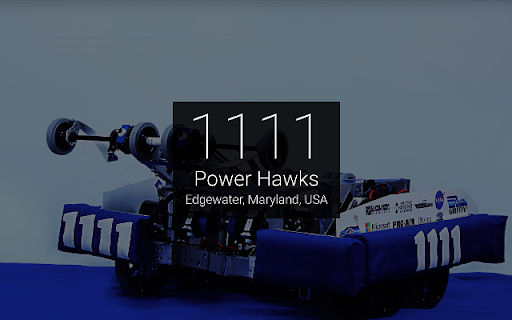
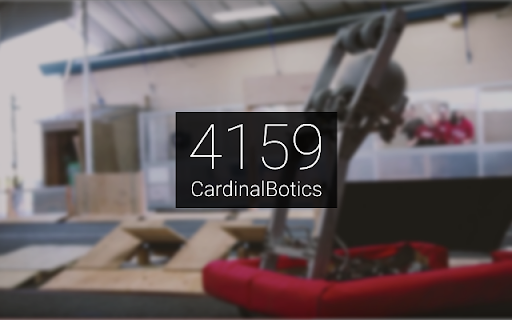
New Tab page to display information about a random FRC team.
Was ist FRC New Tab?
FRC New Tab ist eine Chrome-Erweiterung, die von https://erikboesen.com entwickelt wurde, und ihr Hauptmerkmal ist "New Tab page to display information about a random FRC team.".
Erweiterungsscreenshots

FRC New Tab-Erweiterungs-CRX-Datei herunterladen
Laden Sie FRC New Tab-Erweiterungsdateien im crx-Format herunter, installieren Sie Chrome-Erweiterungen manuell im Browser oder teilen Sie die crx-Dateien mit Freunden, um Chrome-Erweiterungen einfach zu installieren.
Anleitung zur Verwendung der Erweiterung
                        Display information about a random FIRST Robotics Competition team in your new tab! Or, display the current time as a team.

Features:
- Option to customize list of teams from which a random one is chosen, or keep it permanently on one
- Clock Mode: the team will be shown which corresponds to the current time.
- Hide or show team location and/or name
- More features coming soon!

This project is open source on GitHub! Contributions and improvements are VERY welcome!
https://github.com/ErikBoesen/FRCNewTab
Grundlegende Informationen zur Erweiterung
| Name |  FRC New Tab FRC New Tab |
| ID | agmoglelphhinnadfmbfodhkdagibkop |
| Offizielle URL | https://chromewebstore.google.com/detail/frc-new-tab/agmoglelphhinnadfmbfodhkdagibkop |
| Beschreibung | New Tab page to display information about a random FRC team. |
| Dateigröße | 8.33 MB |
| Installationsanzahl | 192 |
| Aktuelle Version | 1.6.5 |
| Letztes Update | 2018-12-05 |
| Veröffentlichungsdatum | 2018-12-05 |
| Bewertung | 5.00/5 Insgesamt 11 Bewertungen |
| Entwickler | https://erikboesen.com |
| [email protected] | |
| Zahlungsart | free |
| Unterstützte Sprachen | en |
| manifest.json | |
{
    "update_url": "https:\/\/clients2.google.com\/service\/update2\/crx",
    "manifest_version": 2,
    "name": "FRC New Tab",
    "short_name": "FRCNewTab",
    "description": "New Tab page to display information about a random FRC team.",
    "icons": {
        "128": "res\/img\/128.png"
    },
    "version": "1.6.5",
    "chrome_url_overrides": {
        "newtab": "newtab.html"
    },
    "applications": {
        "gecko": {
            "strict_min_version": "54.0"
        }
    },
    "options_page": "options.html",
    "options_ui": {
        "page": "options.html",
        "open_in_tab": true
    }
} | |