Amazon WishList Sum
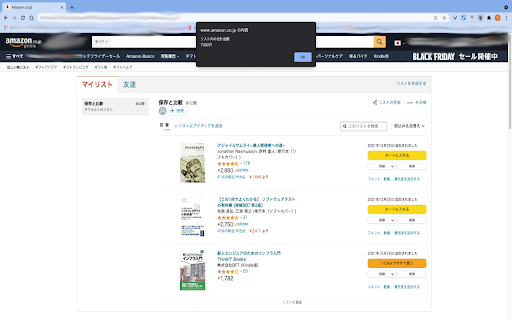
It shows you a total sum of items in your wishlist on amazon.co.jp. (You have to reload a web page if you want to use this again.)
Was ist Amazon WishList Sum?
Amazon WishList Sum ist eine Chrome-Erweiterung, die von TKS entwickelt wurde, und ihr Hauptmerkmal ist "It shows you a total sum of items in your wishlist on amazon.co.jp. (You have to reload a web page if you want to use this again.)".
Erweiterungsscreenshots
Amazon WishList Sum-Erweiterungs-CRX-Datei herunterladen
Laden Sie Amazon WishList Sum-Erweiterungsdateien im crx-Format herunter, installieren Sie Chrome-Erweiterungen manuell im Browser oder teilen Sie die crx-Dateien mit Freunden, um Chrome-Erweiterungen einfach zu installieren.
Anleitung zur Verwendung der Erweiterung
                        You can see the total price in your wishlist without putting them into the cart.

Amazonで商品をカートに入れレジに行く前に、合計金額を知りたい時はありませんか?
ほしい物リストに入っている商品の合計金額を表示することができます!

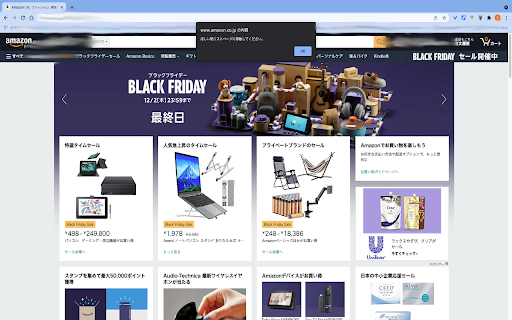
(You have to reload a web page if you want to use this again.)
(同じページで再度使うときはページを一度リロードしてください。)

Here is the code: https://github.com/mugi0096/wishlistSum
Grundlegende Informationen zur Erweiterung
| Name |  Amazon WishList Sum Amazon WishList Sum |
| ID | ajbgdhggiminjddnpjdcgoconpjgkkfi |
| Offizielle URL | https://chromewebstore.google.com/detail/amazon-wishlist-sum/ajbgdhggiminjddnpjdcgoconpjgkkfi |
| Beschreibung | It shows you a total sum of items in your wishlist on amazon.co.jp. (You have to reload a web page if you want to use this again.) |
| Dateigröße | 4.97 KB |
| Installationsanzahl | 341 |
| Aktuelle Version | 1.0.0 |
| Letztes Update | 2021-12-03 |
| Veröffentlichungsdatum | 2021-12-02 |
| Bewertung | 5.00/5 Insgesamt 1 Bewertungen |
| Entwickler | TKS |
| [email protected] | |
| Zahlungsart | free |
| Unterstützte Sprachen | ja |
| manifest.json | |
{
    "update_url": "https:\/\/clients2.google.com\/service\/update2\/crx",
    "name": "Amazon WishList Sum",
    "version": "1.0.0",
    "manifest_version": 3,
    "description": "It shows you a total sum of items in your wishlist on amazon.co.jp. (You have to reload a web page if you want to use this again.)",
    "action": {
        "default_icon": "icon16.png",
        "default_title": "\u5408\u8a08\u91d1\u984d"
    },
    "icons": {
        "16": "icon16.png"
    },
    "background": {
        "service_worker": "background.js"
    },
    "permissions": [
        "activeTab",
        "scripting"
    ],
    "host_permissions": [
        "https:\/\/www.amazon.co.jp\/*\/wishlist\/*"
    ]
} | |