Tab Heaven
Stop having too many tabs open. Pin tabs you use all the time (like email and facebook), and let Tab Heaven handle the rest. You…
Was ist Tab Heaven?
Tab Heaven ist eine Chrome-Erweiterung, die von iamnotnader entwickelt wurde, und ihr Hauptmerkmal ist "Stop having too many tabs open. Pin tabs you use all the time (like email and facebook), and let Tab Heaven handle the rest. You…".
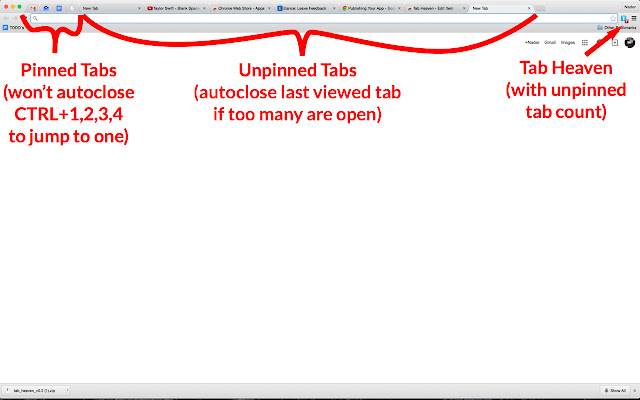
Erweiterungsscreenshots
Tab Heaven-Erweiterungs-CRX-Datei herunterladen
Laden Sie Tab Heaven-Erweiterungsdateien im crx-Format herunter, installieren Sie Chrome-Erweiterungen manuell im Browser oder teilen Sie die crx-Dateien mit Freunden, um Chrome-Erweiterungen einfach zu installieren.
Anleitung zur Verwendung der Erweiterung
                        Stop having too many tabs open.


Pin tabs you use all the time (like email and facebook), and let Tab Heaven handle the rest. You can set a maximum number of "unpinned" tabs you'd like to have open. If you open more than the max number of unpinned tabs, Tab Heaven will automatically close your least recently viewed unpinned tab, so you'll never get overloaded.

Access pinned tabs using CTRL+1,2,3,4... hotkeys so you never have to use the mouse for your most important tabs.

Tab Heaven is better than other extensions because it lets you pin tabs you use all the time and prevent them from autoclosing, which is crucial.

Just right-click on a tab to pin it.
Grundlegende Informationen zur Erweiterung
| Name |  Tab Heaven Tab Heaven |
| ID | ajnlnlhcogajdhgjnnolclpcdoamfmlo |
| Offizielle URL | https://chrome.google.com/webstore/detail/tab-heaven/ajnlnlhcogajdhgjnnolclpcdoamfmlo |
| Beschreibung | Stop having too many tabs open. Pin tabs you use all the time (like email and facebook), and let Tab Heaven handle the rest. You… |
| Dateigröße | 51.04 KB |
| Installationsanzahl | 78 |
| Aktuelle Version | 0.2 |
| Letztes Update | 2015-02-03 |
| Veröffentlichungsdatum | 2015-02-03 |
| Bewertung | 4.30/5 Insgesamt 10 Bewertungen |
| Entwickler | iamnotnader |
| Zahlungsart | free |
| Unterstützte Sprachen | en |
| manifest.json | |
{
    "update_url": "https:\/\/clients2.google.com\/service\/update2\/crx",
    "manifest_version": 2,
    "name": "Tab Heaven",
    "version": "0.2",
    "icons": {
        "128": "img\/icon256.png"
    },
    "background": {
        "scripts": [
            "js\/background.js"
        ]
    },
    "browser_action": {
        "default_icon": "img\/icon256.png",
        "default_popup": "html\/popup.html"
    },
    "permissions": [
        "tabs"
    ]
} | |