My Product Library
My Product Library is the ultimate choice for individuals who buy online digital products and need superior protection. You're…
Was ist My Product Library?
My Product Library ist eine Chrome-Erweiterung, die von Chad Nicely entwickelt wurde, und ihr Hauptmerkmal ist "My Product Library is the ultimate choice for individuals who buy online digital products and need superior protection. You're…".
Erweiterungsscreenshots
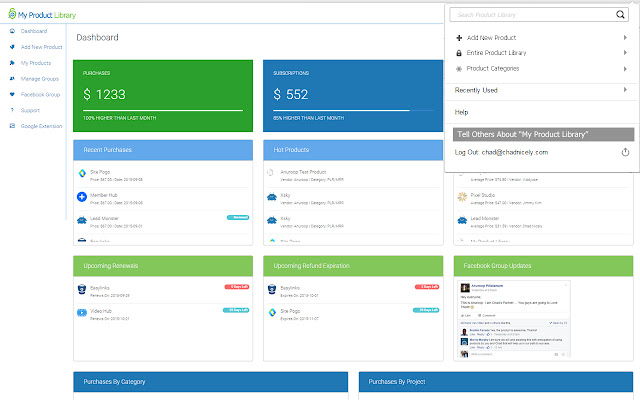
My Product Library-Erweiterungs-CRX-Datei herunterladen
Laden Sie My Product Library-Erweiterungsdateien im crx-Format herunter, installieren Sie Chrome-Erweiterungen manuell im Browser oder teilen Sie die crx-Dateien mit Freunden, um Chrome-Erweiterungen einfach zu installieren.
Anleitung zur Verwendung der Erweiterung
                        My Product Library is the ultimate choice for individuals who buy online digital products and need superior protection.

You're able to store all of your data associated with your purchases.

Included Features:

Assign tags to your products, categorize your products by specific types, keep track of all your additional purchases with associated with the product, store your original files, any images associated with the purchases, leave and read reviews for specific products and so much more.
Grundlegende Informationen zur Erweiterung
| Name |  My Product Library My Product Library |
| ID | baoaidicanjjhlchlnhdpnikicblipah |
| Offizielle URL | https://chrome.google.com/webstore/detail/my-product-library/baoaidicanjjhlchlnhdpnikicblipah |
| Beschreibung | My Product Library is the ultimate choice for individuals who buy online digital products and need superior protection. You're… |
| Dateigröße | 544 KB |
| Installationsanzahl | 499 |
| Aktuelle Version | 1.0.13 |
| Letztes Update | 2015-12-17 |
| Veröffentlichungsdatum | 2015-12-17 |
| Bewertung | 5.00/5 Insgesamt 11 Bewertungen |
| Entwickler | Chad Nicely |
| [email protected] | |
| Zahlungsart | free |
| Erweiterungswebsite | http://myproductlibrary.com |
| Hilfeseite URL | http://chadnicely.freshdesk.com |
| Unterstützte Sprachen | en |
| manifest.json | |
{
    "update_url": "https:\/\/clients2.google.com\/service\/update2\/crx",
    "name": "My Product Library",
    "version": "1.0.13",
    "manifest_version": 2,
    "icons": {
        "16": "icons\/16x16.png",
        "48": "icons\/48x48.png",
        "128": "icons\/128x128.png"
    },
    "permissions": [
        "tabs",
        "storage",
        "downloads",
        "activeTab",
        "tabs",
        "cookies",
        "clipboardWrite",
        "notifications",
        "http:\/\/*\/",
        "https:\/\/*\/"
    ],
    "browser_action": {
        "default_icon": {
            "19": "icons\/19x19.png",
            "38": "icons\/38x38.png"
        },
        "default_title": "My Product Library",
        "default_popup": "popup.html"
    },
    "background": {
        "page": "background.html",
        "persistent": true
    }
} | |