Quick Bookmark
Easily add bookmarks to any category. Includes spotlight-like search with mouse/keyboard support. Default key: cmd+b (win:ctrl+b)
Was ist Quick Bookmark?
Quick Bookmark ist eine Chrome-Erweiterung, die von fangxing204 entwickelt wurde, und ihr Hauptmerkmal ist "Easily add bookmarks to any category. Includes spotlight-like search with mouse/keyboard support. Default key: cmd+b (win:ctrl+b)".
Erweiterungsscreenshots
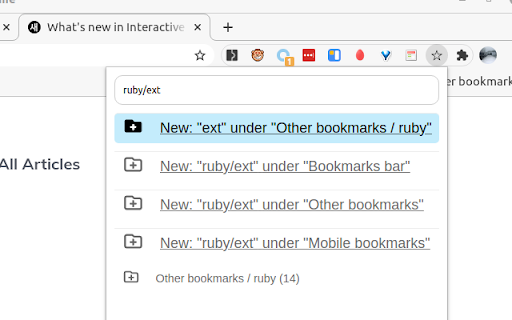

Quick Bookmark-Erweiterungs-CRX-Datei herunterladen
Laden Sie Quick Bookmark-Erweiterungsdateien im crx-Format herunter, installieren Sie Chrome-Erweiterungen manuell im Browser oder teilen Sie die crx-Dateien mit Freunden, um Chrome-Erweiterungen einfach zu installieren.
Anleitung zur Verwendung der Erweiterung
                        Github: https://github.com/fffx/quick-bookmark
 * Easily bookmark page to any folder
 * Support Chinese pinyin
 * Support new Folder by search parent folder

## [v1.3.8] - 2021-01-12
### Added
- Create folder at the top of the list.

## [v1.3.7] - 2021-01-12
### Added
- Hold Shift key to save root url(domain) only
### Fixed
- Fix mouse click not working


## [v1.3.6] - 2021-01-12
### Added
- Update license
- Show current tab bookmark count in icon badge
- Fix only github release action, only release on `v*` tags
- Ignore hashtag when compare bookmark url
- Update Icon with outline & fill
- Support new Folder under searched folders

## [v1.3.5] - 2020-12-26
### Added
- Add github action for release and upload build assets
- Debounce scroll
### Fixd
- Fix Nested folder name when depth > 2

## [v1.3.4] - 2020-12-24
### Added
- Pinyin support by https://github.com/creeperyang/pinyin
- Add Folder icon
- Support Choose root folder when new Folder
- Sort bookmark that contained current tab to first position


## [v1.3.3] - 2020-12-12

- Initial transport [chrome-better-bookmark](https://github.com/ardcore/chrome-better-bookmark) into React version, use [web-extension-starter](https://github.com/abhijithvijayan/web-extension-starter/tree/react-javascript)
Grundlegende Informationen zur Erweiterung
| Name |  Quick Bookmark Quick Bookmark |
| ID | bbjekmkfbdemdbfkckbakmmiceppjkdc |
| Offizielle URL | https://chromewebstore.google.com/detail/quick-bookmark/bbjekmkfbdemdbfkckbakmmiceppjkdc |
| Beschreibung | Easily add bookmarks to any category. Includes spotlight-like search with mouse/keyboard support. Default key: cmd+b (win:ctrl+b) |
| Dateigröße | 78.07 KB |
| Installationsanzahl | 26 |
| Aktuelle Version | 1.3.8 |
| Letztes Update | 2021-06-28 |
| Veröffentlichungsdatum | 2020-12-26 |
| Bewertung | 4.00/5 Insgesamt 2 Bewertungen |
| Entwickler | fangxing204 |
| [email protected] | |
| Zahlungsart | free |
| Erweiterungswebsite | https://github.com/fffx/quick-bookmark |
| Unterstützte Sprachen | en-US |
| manifest.json | |
{
    "update_url": "https:\/\/clients2.google.com\/service\/update2\/crx",
    "manifest_version": 2,
    "name": "Quick Bookmark",
    "version": "1.3.8",
    "icons": {
        "16": "assets\/icons\/bookmark.png",
        "32": "assets\/icons\/bookmark.png",
        "48": "assets\/icons\/bookmark.png",
        "128": "assets\/icons\/bookmark.png"
    },
    "description": "Easily add bookmarks to any category. Includes spotlight-like search with mouse\/keyboard support. Default key: cmd+b (win:ctrl+b)",
    "homepage_url": "https:\/\/github.com\/fffx\/quick-bookmark",
    "short_name": "Quick Bookmark",
    "permissions": [
        "bookmarks",
        "tabs"
    ],
    "content_security_policy": "script-src 'self'; object-src 'self'",
    "author": "Fang Xing",
    "minimum_chrome_version": "49",
    "browser_action": {
        "default_popup": "popup.html",
        "default_icon": {
            "16": "assets\/icons\/bookmark.png",
            "32": "assets\/icons\/bookmark.png",
            "48": "assets\/icons\/bookmark.png",
            "128": "assets\/icons\/bookmark.png"
        },
        "default_title": "Quick Bookmark",
        "chrome_style": false
    },
    "background": {
        "scripts": [
            "js\/background.bundle.js"
        ],
        "persistent": false
    },
    "commands": {
        "_execute_browser_action": {
            "suggested_key": {
                "default": "Ctrl+B",
                "windows": "Ctrl+B",
                "mac": "Command+B",
                "chromeos": "Ctrl+B",
                "linux": "Ctrl+B"
            }
        }
    }
} | |