SOS Ticket Extension
Industry-leading Data Tool for Primary & Secondary Ticket Marketplaces.
Was ist SOS Ticket Extension?
SOS Ticket Extension ist eine Chrome-Erweiterung, die von Shows On Sale entwickelt wurde, und ihr Hauptmerkmal ist "Industry-leading Data Tool for Primary & Secondary Ticket Marketplaces.".
Erweiterungsscreenshots
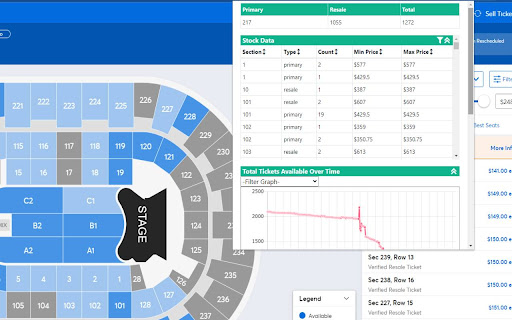
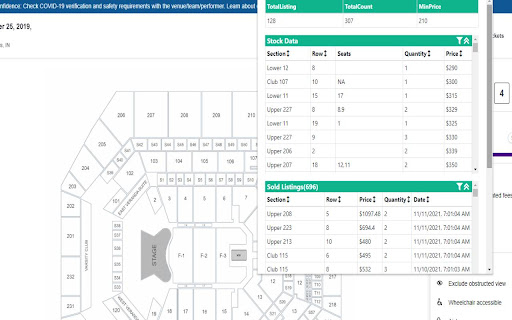
SOS Ticket Extension-Erweiterungs-CRX-Datei herunterladen
Laden Sie SOS Ticket Extension-Erweiterungsdateien im crx-Format herunter, installieren Sie Chrome-Erweiterungen manuell im Browser oder teilen Sie die crx-Dateien mit Freunden, um Chrome-Erweiterungen einfach zu installieren.
Anleitung zur Verwendung der Erweiterung
Extension for all ticket related websites provided by showsonsale Grundlegende Informationen zur Erweiterung
| Name |  SOS Ticket Extension SOS Ticket Extension |
| ID | bciapecjfmaegmfpofmbfigkoagdknpj |
| Offizielle URL | https://chromewebstore.google.com/detail/sos-ticket-extension/bciapecjfmaegmfpofmbfigkoagdknpj |
| Beschreibung | Industry-leading Data Tool for Primary & Secondary Ticket Marketplaces. |
| Dateigröße | 3.46 MB |
| Installationsanzahl | 3,752 |
| Aktuelle Version | 1.9.3.1 |
| Letztes Update | 2024-02-28 |
| Veröffentlichungsdatum | 2021-11-13 |
| Bewertung | 4.00/5 Insgesamt 4 Bewertungen |
| Entwickler | Shows On Sale |
| [email protected] | |
| Zahlungsart | free |
| Erweiterungswebsite | https://showsonsale.com/ |
| Hilfeseite URL | https://www.showsonsale.com/contact |
| URL der Datenschutzrichtlinien-Seite | https://www.showsonsale.com/terms |
| Unterstützte Sprachen | en-US |
| manifest.json | |
{
    "update_url": "https:\/\/clients2.google.com\/service\/update2\/crx",
    "name": "SOS Ticket Extension",
    "version": "1.9.3.1",
    "version_name": "1.9.3.1",
    "description": "Industry-leading Data Tool for Primary & Secondary Ticket Marketplaces.",
    "manifest_version": 3,
    "icons": {
        "128": "assets\/favicon.png",
        "16": "assets\/favicon.png",
        "32": "assets\/favicon.png",
        "48": "assets\/favicon.png"
    },
    "permissions": [
        "activeTab",
        "storage",
        "scripting",
        "http:\/\/*\/*",
        "https:\/\/*\/*"
    ],
    "host_permissions": [
        "*:\/\/*.ticketmaster.com\/*",
        "*:\/\/*.livenation.com\/*",
        "*:\/\/*.ticketmaster.ca\/*",
        "*:\/\/*.livenation.ca\/*",
        "https:\/\/unifiedapicommerce.us-prod0.axs.com\/*",
        "https:\/\/www.stubhub.com\/*",
        "https:\/\/www.stubhub.ca\/*",
        "https:\/\/www.viagogo.com\/*",
        "*:\/\/*.seatgeek.com\/*"
    ],
    "content_scripts": [
        {
            "matches": [
                "*:\/\/tix.axs.com\/*",
                "*:\/\/www.stubhub.com\/*",
                "*:\/\/www.stubhub.ca\/*",
                "*:\/\/www.viagogo.com\/*",
                "*:\/\/www.viagogo.ca\/*",
                "*:\/\/www.seatgeek.com\/*",
                "*:\/\/*.ticketmaster.com\/*",
                "*:\/\/*.ticketmaster.ca\/*",
                "*:\/\/*.livenation.com\/*",
                "*:\/\/*.livenation.ca\/*"
            ],
            "run_at": "document_start",
            "js": [
                "assets\/js\/content-script\/inject.js",
                "assets\/js\/jquery\/jquery-3.6.0.min.js",
                "assets\/tm_background.js",
                "assets\/sh_background.js"
            ]
        }
    ],
    "action": {
        "default_icon": "assets\/favicon.png",
        "default_popup": "index.html"
    },
    "commands": {
        "_execute_action": {
            "suggested_key": {
                "mac": "MacCtrl+Q",
                "windows": "Ctrl+Q"
            },
            "description": "Start the extension"
        }
    },
    "web_accessible_resources": [
        {
            "resources": [
                "assets\/js\/content-script\/xhr.js",
                "assets\/*"
            ],
            "matches": [
                "http:\/\/*\/*",
                "https:\/\/*\/*",
                "*:\/\/*\/*"
            ]
        }
    ]
} | |