GM Cheems
Chess.com and Lichess assistant
Was ist GM Cheems?
GM Cheems ist eine Chrome-Erweiterung, die von http://gmcheems.com entwickelt wurde, und ihr Hauptmerkmal ist "Chess.com and Lichess assistant".
Erweiterungsscreenshots
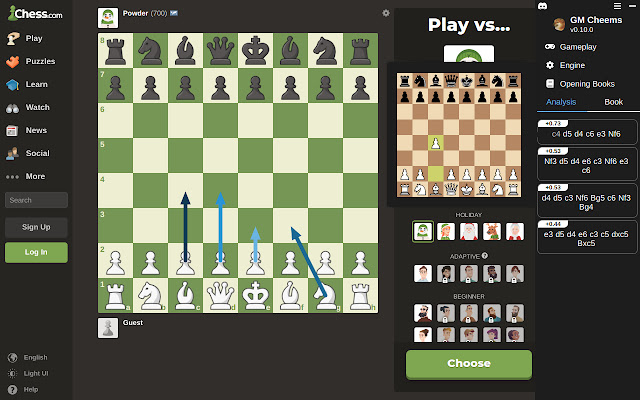
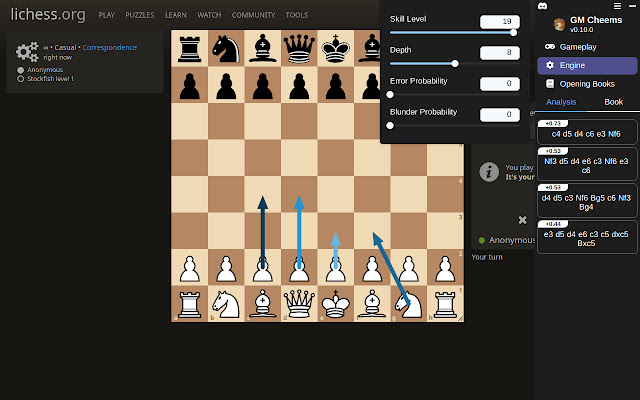
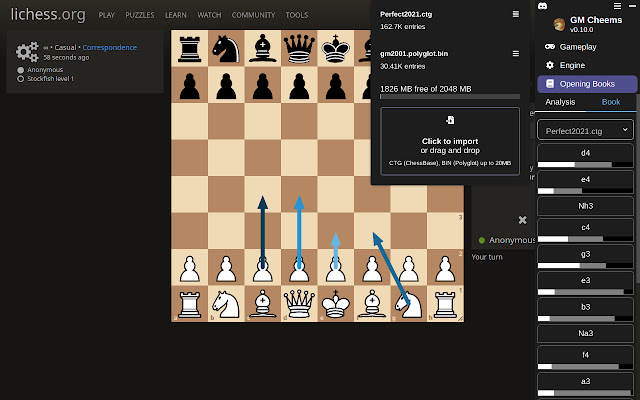
GM Cheems-Erweiterungs-CRX-Datei herunterladen
Laden Sie GM Cheems-Erweiterungsdateien im crx-Format herunter, installieren Sie Chrome-Erweiterungen manuell im Browser oder teilen Sie die crx-Dateien mit Freunden, um Chrome-Erweiterungen einfach zu installieren.
Anleitung zur Verwendung der Erweiterung
                        GM Cheems helps you improve your chess skills by providing insight, hints and tips in real-time.

Changelog
------------------
0.11.0 - January 22, 2023
Added option to auto-play from a combination of book and engine movies
Draw opening book move arrows alongside engine move arrows
Chess board that is shown when hovering over a line will now stay in place as you move your cursor over each move
Split up the Gameplay options into three sub-menus

0.10.0 - December 24, 2022
Opening Books can now be imported and used during analysis! 🚀
Moves are now shown in SAN notation

0.9.0 - November 19, 2022
Added support for puzzle mode on Chess.com
Added option to choose how many lines to analyze
Added option to choose which line to draw arrows for
Fixed a bug where some options weren't being applied correctly
Grundlegende Informationen zur Erweiterung
| Name |  GM Cheems GM Cheems |
| ID | bmkmigdaklnhklmiialljbpjiedmnifh |
| Offizielle URL | https://chrome.google.com/webstore/detail/gm-cheems/bmkmigdaklnhklmiialljbpjiedmnifh |
| Beschreibung | Chess.com and Lichess assistant |
| Dateigröße | 1.44 MB |
| Installationsanzahl | 662 |
| Aktuelle Version | 0.11.4 |
| Letztes Update | 2023-05-17 |
| Veröffentlichungsdatum | 2022-08-02 |
| Bewertung | 3.86/5 Insgesamt 7 Bewertungen |
| Entwickler | http://gmcheems.com |
| [email protected] | |
| Zahlungsart | in_app |
| Erweiterungswebsite | https://www.gmcheems.com/ |
| Hilfeseite URL | https://gmcheems.com |
| Unterstützte Sprachen | en |
| manifest.json | |
{
    "update_url": "https:\/\/clients2.google.com\/service\/update2\/crx",
    "description": "Chess.com and Lichess assistant",
    "version": "0.11.4",
    "name": "GM Cheems",
    "manifest_version": 3,
    "action": [],
    "background": {
        "service_worker": "background-wrapper.js"
    },
    "icons": {
        "128": "cheems_128.png"
    },
    "content_scripts": [
        {
            "run_at": "document_start",
            "matches": [
                "https:\/\/lichess.org\/*"
            ],
            "js": [
                "gmcContent.bundle.js"
            ]
        },
        {
            "run_at": "document_idle",
            "matches": [
                "https:\/\/*.chess.com\/*"
            ],
            "js": [
                "gmcContent.bundle.js"
            ]
        },
        {
            "run_at": "document_idle",
            "matches": [
                "https:\/\/lichess.org\/*",
                "https:\/\/*.chess.com\/*"
            ],
            "js": [
                "contentApp.bundle.js"
            ]
        }
    ],
    "content_security_policy": {
        "extension_pages": "script-src 'self'; object-src 'self'"
    },
    "web_accessible_resources": [
        {
            "resources": [
                "pages\/opening-book-import.html",
                "pages\/assets\/opening-book-import.bundle.js",
                "pages\/st11.html",
                "pages\/assets\/st11.wasm",
                "pages\/assets\/st11.js",
                "pages\/assets\/st11-proc.bundle.js"
            ],
            "matches": [
                "https:\/\/lichess.org\/*",
                "https:\/\/*.chess.com\/*"
            ],
            "use_dynamic_url": true
        }
    ],
    "sandbox": {
        "pages": [
            "pages\/st11.html",
            "pages\/opening-book-import.html"
        ]
    },
    "permissions": [
        "storage"
    ]
} | |