Change Page Colors
A tool that automatically change the color of background and text in the page
Was ist Change Page Colors?
Change Page Colors ist eine Chrome-Erweiterung, die von zanomate entwickelt wurde, und ihr Hauptmerkmal ist "A tool that automatically change the color of background and text in the page".
Erweiterungsscreenshots
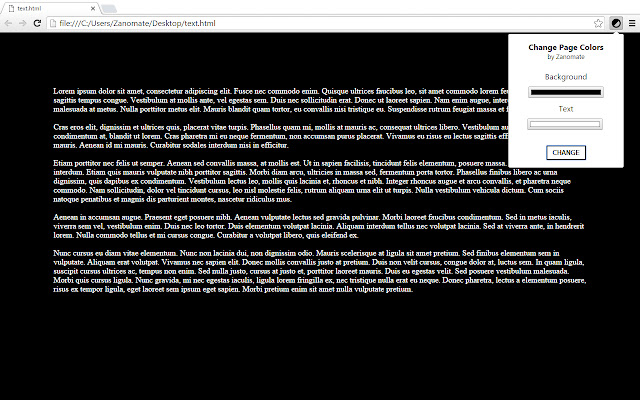

Change Page Colors-Erweiterungs-CRX-Datei herunterladen
Laden Sie Change Page Colors-Erweiterungsdateien im crx-Format herunter, installieren Sie Chrome-Erweiterungen manuell im Browser oder teilen Sie die crx-Dateien mit Freunden, um Chrome-Erweiterungen einfach zu installieren.
Anleitung zur Verwendung der Erweiterung
                        "Change Page Colors" is a tool that allow users to easily change main background and text colors of any web page. The purpose is to make reading more confortable and adaptive to the user preferences.

Functionality (First release)
- Change background and text color a any page with a click.
- Choose your favorite colors and the tool will remember your last choice.
Grundlegende Informationen zur Erweiterung
| Name |  Change Page Colors Change Page Colors |
| ID | bpffefpenhflenffmncchaepkgebkpne |
| Offizielle URL | https://chrome.google.com/webstore/detail/change-page-colors/bpffefpenhflenffmncchaepkgebkpne |
| Beschreibung | A tool that automatically change the color of background and text in the page |
| Dateigröße | 43.54 KB |
| Installationsanzahl | 4,311 |
| Aktuelle Version | 1.0.0.0 |
| Letztes Update | 2016-02-27 |
| Veröffentlichungsdatum | 2016-02-27 |
| Bewertung | 2.55/5 Insgesamt 22 Bewertungen |
| Entwickler | zanomate |
| Zahlungsart | free |
| Unterstützte Sprachen | en |
| manifest.json | |
{
"update_url": "https:\/\/clients2.google.com\/service\/update2\/crx",
"manifest_version": 2,
"version": "1.0.0.0",
"name": "Change Page Colors",
"description": "A tool that automatically change the color of background and text in the page",
"background": {
"scripts": [
"background.js"
]
},
"content_security_policy": "script-src 'self' https:\/\/apis.google.com; object-src 'self'",
"browser_action": {
"default_icon": "imgs\/128.png",
"default_popup": "popup.html"
},
"permissions": [
" | |