TaskPace AI Sidebar
A sidebar with your TaskPace tasks that integrates into your Salesforce, LinkedIn, Trello, G Suite, Office 365, and others.
Was ist TaskPace AI Sidebar?
TaskPace AI Sidebar ist eine Chrome-Erweiterung, die von http://taskpace.com entwickelt wurde, und ihr Hauptmerkmal ist "A sidebar with your TaskPace tasks that integrates into your Salesforce, LinkedIn, Trello, G Suite, Office 365, and others.".
Erweiterungsscreenshots


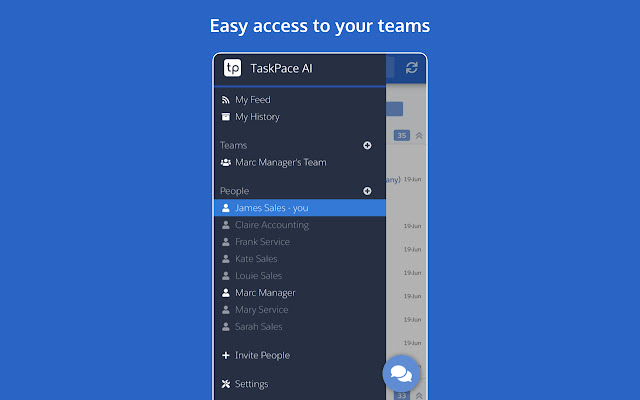

TaskPace AI Sidebar-Erweiterungs-CRX-Datei herunterladen
Laden Sie TaskPace AI Sidebar-Erweiterungsdateien im crx-Format herunter, installieren Sie Chrome-Erweiterungen manuell im Browser oder teilen Sie die crx-Dateien mit Freunden, um Chrome-Erweiterungen einfach zu installieren.
Anleitung zur Verwendung der Erweiterung
A sidebar with your TaskPace tasks that integrates into your Salesforce, LinkedIn, Trello, G Suite, and Office 365. Grundlegende Informationen zur Erweiterung
| Name |  TaskPace AI Sidebar TaskPace AI Sidebar |
| ID | cidommnppailjnpdlncmhnflmpnfoddl |
| Offizielle URL | https://chrome.google.com/webstore/detail/taskpace-ai-sidebar/cidommnppailjnpdlncmhnflmpnfoddl |
| Beschreibung | A sidebar with your TaskPace tasks that integrates into your Salesforce, LinkedIn, Trello, G Suite, Office 365, and others. |
| Dateigröße | 145 KB |
| Installationsanzahl | 15 |
| Aktuelle Version | 5.1.5 |
| Letztes Update | 2019-06-19 |
| Veröffentlichungsdatum | 2019-06-19 |
| Bewertung | 5.00/5 Insgesamt 2 Bewertungen |
| Entwickler | http://taskpace.com |
| Zahlungsart | free |
| Erweiterungswebsite | https://app.taskpace.com |
| Unterstützte Sprachen | en |
| manifest.json | |
{
    "update_url": "https:\/\/clients2.google.com\/service\/update2\/crx",
    "name": "TaskPace AI Sidebar",
    "short_name": "TaskPace",
    "version": "5.1.5",
    "manifest_version": 2,
    "key": "MIIBIjANBgkqhkiG9w0BAQEFAAOCAQ8AMIIBCgKCAQEAuDoRmiQAe1wQ\/rUylnpqQnqWA1ODd6Vu0Dh2jusaLsrSjYmtIHH++NWFr8eMyCbM1O+n1d8QWx8yG7DI6vCkonegdwk8i64a+dpDM\/GkGFglTV2qS7Fk\/KWd3aEwOTTzD3LDxvDsM+Ou5qnVtOxezaTxlOthiJv4TRbdKy00fYZRcE\/E+k24QHwWFnKG726vqOV7FqXcJltUH6pQbLjI9Bceq1hUdScZN18L3iNgzN4LOHO0Wiy489rKvncrQ7IbrygeQRM9ZCvOhReJPvdhcTyx2LhcJYUlrTULg1NJoa0POlbmOkWOOK\/4xQwrzGqSp9jxEhgD6C5CzGyU5vChaQIDAQAB",
    "description": "A sidebar with your TaskPace tasks that integrates into your Salesforce, LinkedIn, Trello, G Suite, Office 365, and others.",
    "author": "TaskPace AI",
    "homepage_url": "https:\/\/www.taskpace.com",
    "icons": {
        "16": "logo.png",
        "48": "logo.png",
        "128": "logo.png"
    },
    "content_scripts": [
        {
            "css": [
                "ext.css"
            ],
            "js": [
                "contentscript.js",
                "jquery.min.js"
            ],
            "matches": [
                "https:\/\/*.salesforce.com\/*",
                "https:\/\/*.lightning.force.com\/*",
                "https:\/\/mail.google.com\/*",
                "https:\/\/inbox.google.com\/*",
                "https:\/\/calendar.google.com\/*",
                "https:\/\/www.linkedin.com\/*",
                "https:\/\/trello.com\/*",
                "https:\/\/outlook.live.com\/*",
                "https:\/\/outlook.office365.com\/*",
                "https:\/\/outlook.office.com\/*"
            ],
            "all_frames": true
        }
    ],
    "web_accessible_resources": [
        "https:\/\/sandbox.taskpace.com",
        "https:\/\/app.taskpace.com",
        "https:\/\/test1.taskpace.com:8081",
        "https:\/\/test2.taskpace.com:8081",
        "frame.html",
        "frameloader.js"
    ],
    "browser_action": {
        "default_icon": "logo.png"
    },
    "background": {
        "persistent": true,
        "scripts": [
            "background.js"
        ]
    },
    "content_security_policy": "script-src 'self' https:\/\/ajax.googleapis.com; object-src 'self'; frame-src 'self' https:\/\/*.taskpace.com https:\/\/*.taskpace.com:8081 https:\/\/gateway.zscalertwo.net",
    "permissions": [
        "tabs",
        "webRequest",
        "notifications",
        "storage",
        "webNavigation",
        "https:\/\/*.taskpace.com\/*",
        "https:\/\/*.salesforce.com\/*",
        "https:\/\/*.lightning.force.com\/*",
        "https:\/\/mail.google.com\/*",
        "https:\/\/inbox.google.com\/*",
        "https:\/\/calendar.google.com\/*",
        "https:\/\/www.linkedin.com\/*",
        "https:\/\/trello.com\/*",
        "https:\/\/outlook.live.com\/*",
        "https:\/\/outlook.office365.com\/*",
        "https:\/\/outlook.office.com\/*"
    ],
    "externally_connectable": {
        "matches": [
            "https:\/\/*.taskpace.com\/*",
            "https:\/\/*.taskpace.com:8081\/*"
        ]
    },
    "options_ui": {
        "page": "options.html",
        "open_in_tab": false
    }
} | |