Copy Todoist Tasks
Copy the task list on Todoist to clipboard.
Was ist Copy Todoist Tasks?
Copy Todoist Tasks ist eine Chrome-Erweiterung, die von tawara entwickelt wurde, und ihr Hauptmerkmal ist "Copy the task list on Todoist to clipboard.".
Erweiterungsscreenshots
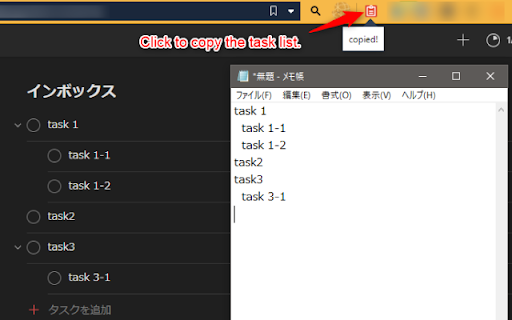
Copy Todoist Tasks-Erweiterungs-CRX-Datei herunterladen
Laden Sie Copy Todoist Tasks-Erweiterungsdateien im crx-Format herunter, installieren Sie Chrome-Erweiterungen manuell im Browser oder teilen Sie die crx-Dateien mit Freunden, um Chrome-Erweiterungen einfach zu installieren.
Anleitung zur Verwendung der Erweiterung
                        This extension allows you to copy the task list on Todoist (https://todoist.com/) to the clipboard.

You can also optionally set the format for copying, such as indenting to indicate the parent-child relationship of the task.

---
この拡張機能を利用することで、Todoist (https://todoist.com/) 上のタスクリストをクリップボードにコピーすることができます。

タスクの親子関係を示すインデントなど、コピーする際の書式をオプションで設定することも可能です。
Grundlegende Informationen zur Erweiterung
| Name |  Copy Todoist Tasks Copy Todoist Tasks |
| ID | cifleikfldjohjpfkjpngjldplllcnol |
| Offizielle URL | https://chromewebstore.google.com/detail/copy-todoist-tasks/cifleikfldjohjpfkjpngjldplllcnol |
| Beschreibung | Copy the task list on Todoist to clipboard. |
| Dateigröße | 19.87 KB |
| Installationsanzahl | 56 |
| Aktuelle Version | 0.0.3 |
| Letztes Update | 2020-08-16 |
| Veröffentlichungsdatum | 2020-08-07 |
| Bewertung | 4.75/5 Insgesamt 4 Bewertungen |
| Entwickler | tawara |
| [email protected] | |
| Zahlungsart | free |
| Unterstützte Sprachen | ja |
| manifest.json | |
{
    "update_url": "https:\/\/clients2.google.com\/service\/update2\/crx",
    "name": "Copy Todoist Tasks",
    "version": "0.0.3",
    "description": "Copy the task list on Todoist to clipboard.",
    "permissions": [
        "activeTab",
        "declarativeContent",
        "clipboardRead",
        "storage"
    ],
    "background": {
        "scripts": [
            "background.js"
        ],
        "persistent": false
    },
    "page_action": {
        "default_popup": "popup.html",
        "default_icon": {
            "32": "images\/clip32.png"
        }
    },
    "options_page": "options.html",
    "icons": {
        "16": "images\/clip16.png",
        "48": "images\/clip48.png",
        "128": "images\/clip128.png"
    },
    "manifest_version": 2
} | |